Storage Bin Inventory System
You need one charger, extension cord, holiday hook, document, or spare part. You know it’s in a bin somewhere, but every bin looks the same. A searchable storage bin inventory tells you exactly which bin holds what you’re looking for — no more opening all of them.
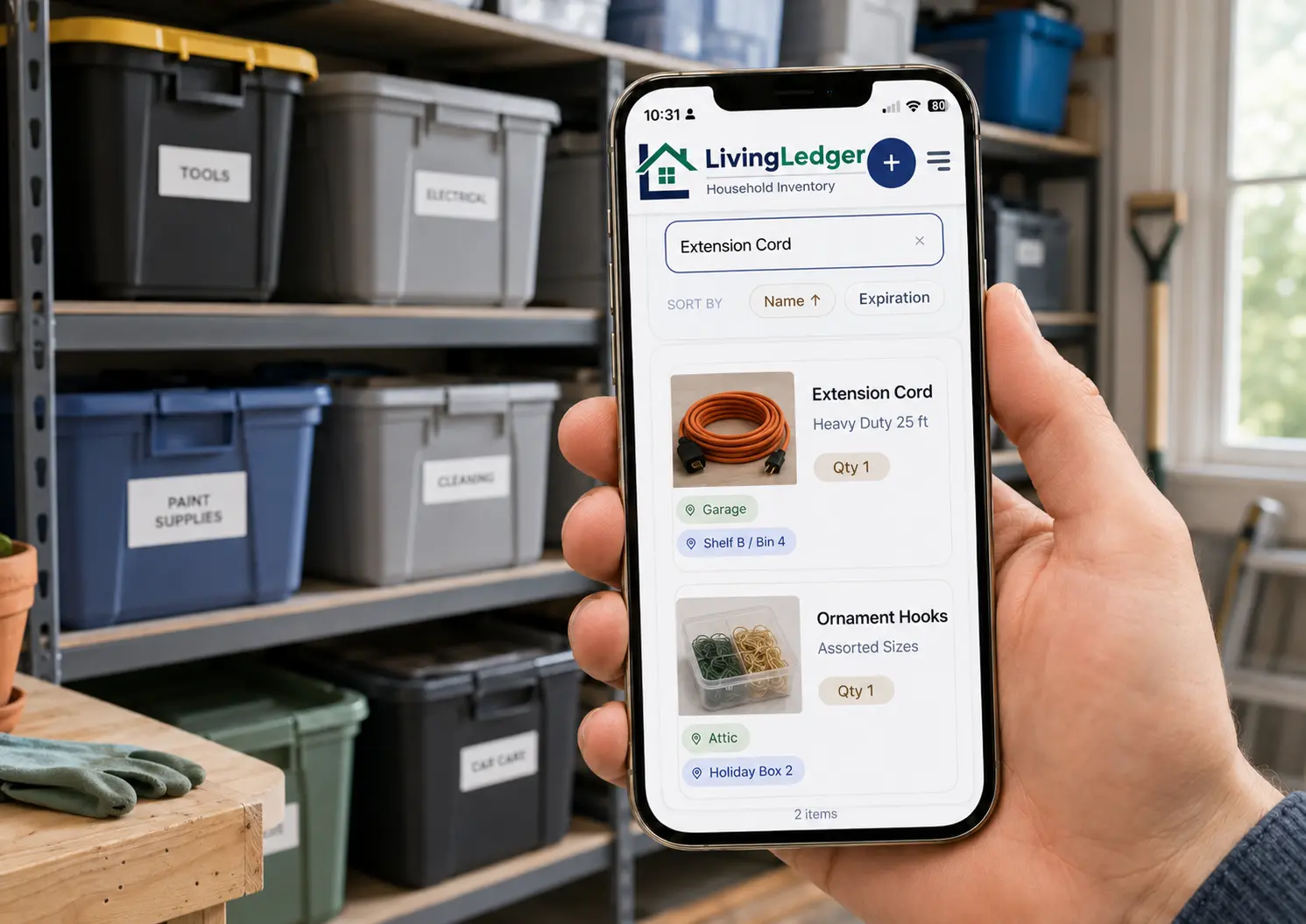
Storage bins are useful right up until you need something out of one. Then they become a guessing game: which bin? which shelf? which corner of the garage? Most people end up opening four or five bins to find one specific thing — or give up and rebuy.
Take a photo. Save what’s inside. Search before you dig. That’s the whole system. LivingLedger works as an app to organize storage bins and as a general home inventory app, with a Free plan generous enough to cover the bins that actually matter.
The problem with storage bins
When you don’t track what is inside bins, finding one thing turns into an afternoon of digging. A few patterns explain most of it:
Storage bin labels are helpful, but searchable inventory is better
A written label tells you the broad category. A searchable inventory tells you what is actually inside. The two complement each other — keep the marker label so you can see at a glance which category a bin belongs to, then let the app remember the specific contents. You’ll thank yourself the first time you search “Allen wrench” and walk straight to the right bin instead of opening five.
How to create a storage bin inventory
Give each bin a simple name
You don’t need a numbering system. Short, specific names work better than a perfect taxonomy. Examples: Garage Bin A, Holiday Box 2, Attic Clothes 1, Closet Tub B, Storage Unit Kitchen 3. The name is just the handle you’ll search against later.
Take a photo before closing the bin
Right before the lid goes on, lay the contents out so you can see everything, and take one clear photo from above. That single image is what your storage bin inventory has to work with later, so make it count — pulling a few things to the front so they’re visible is enough. Photo-first beats typing 30 item names.
Save the important items inside
Open the photo in LivingLedger. The AI scan suggests up to 10 identifiable items from one image — tools, cables, ornaments, mugs, folders, whatever is visible. Review what it found, edit or delete anything that’s wrong, and save the items you actually want to be able to search for. You don’t have to log every screw — log the things you’ll go looking for later.
Add the bin’s location
Each item gets a location, and locations can nest up to three levels deep. A few real examples for garage bin inventory, attic storage inventory, and closet bins:
- Garage → Top Shelf → Bin A
- Attic → Left Wall → Holiday Box 2
- Closet → Top Shelf → Winter Clothes
Once a bin has a location, every item inside that bin inherits the same path. You set it once per bin.
Search before opening bins
This is where the system pays off. Need an extension cord? Search “extension cord” and the app tells you which bin and which shelf. Same for “HDMI cable,” “winter gloves,” “ornament hooks,” “tax folder,” “Allen wrench.” You walk straight to the right bin, open it once, and you’re done.
What to track in a storage bin inventory
The goal is useful coverage, not complete coverage. Group bins by space, then log the items you’ll actually want to find later:
tools, cables, hardware, sports gear, leftover paint and painting supplies, automotive parts
holiday decorations, seasonal clothes, kids’ artwork, keepsakes
linens, kids’ clothes (by size), craft supplies, homeschool curriculum, photo albums
camping gear, luggage, emergency supplies, water filters, bulk goods
paper goods, cleaning refills, batteries, light bulbs, sponges
tax papers, manuals, warranties, school records, receipts
Do not inventory every spoon. Track what you will actually search for later — that’s what turns a stack of bins into a searchable home inventory.
Storage bins and moving boxes use the same system
If you’re moving — or your moving boxes have already become long-term storage — the same searchable inventory system works for both. Your storage bin inventory and your storage box inventory are really the same habit applied to different containers. Photograph the contents before the box is taped, save the items, give the box a location, and the bin/box becomes searchable from the moment it lands in the garage or attic. The full walkthrough lives in the moving boxes guide. And if the boxes you’re sorting belong to a relative’s estate, the estate inventory guide covers that quieter version of the same system.
How LivingLedger helps
- Scan one bin photo and review the AI’s suggestions before saving — you stay in control of what’s logged.
- Save items with a named bin and a location, so the inventory always knows where to point you.
- Search by item name later from your phone in the garage or your desktop in the office — same inventory, same answer.
- Three-level locations let you mirror real-world structure: Garage → Top Shelf → Bin A or Attic → Left Wall → Holiday Box 2.
- Start free with unlimited manual items.
- 50 lifetime AI photo scan credits on the Free plan are enough to cover the bins that actually matter.
- Available as a web app and an iPhone/iPad app — use whichever is closer when you’re in the garage.
Try it free. Start with the bin you most often dig through.
If hidden storage is leading to extra spending or repeated searches, see our companion guides on how to stop buying things you already own and how to stop losing things at home.
FAQ
Storage bin questions
How do I keep track of what is in my storage bins?
Give each bin a simple name, then log the items inside it in a home inventory app. LivingLedger lets you take one photo of the open bin, review the suggested items, and save them with a location. Later you search by item name and the app tells you exactly which bin to open.
Is labeling bins enough?
Labels work for broad categories like Holiday or Kids’ Clothes, but they fail when you need a specific item. A searchable inventory complements labels — labels help you grab the right bin first try, and the inventory tells you which bin contains the exact thing you’re looking for.
Can I track bins in the garage, attic, basement, and closets?
Yes. Locations can be created up to 3 levels deep, like Garage → Top Shelf → Bin A, or Attic → Left Wall → Holiday Box 2. You can track bins anywhere in the home, including storage units.
How fast can I inventory a bin?
About ten minutes per bin once you have the habit. Take one photo of the open bin and the AI scan suggests up to 10 items at a time. You review what it found, edit anything that’s off, and save with a location.
What if my bins are already sealed?
Inventory bins one at a time as you open them for any other reason — seasonal swaps, deep cleans, decoration cycles. You do not need to do it all at once. Even covering just your three most-searched bins pays off quickly.
Can I use this for moving boxes too?
Yes. The same system works for moving boxes that become long-term storage. Photograph the contents before the box is taped, save the items, give the box a location, and search later when you need something.
Stop opening every bin to find one thing.
Inventory one bin today. Find what’s in it from your phone forever.
Free plan · No credit card required · Web app + iOS app