AI Home Inventory App for Busy Households
Take photos of shelves, boxes, drawers, or household items. The LivingLedger home inventory app can suggest up to 10 visible items from each photo so you can review, save, and search your inventory later.
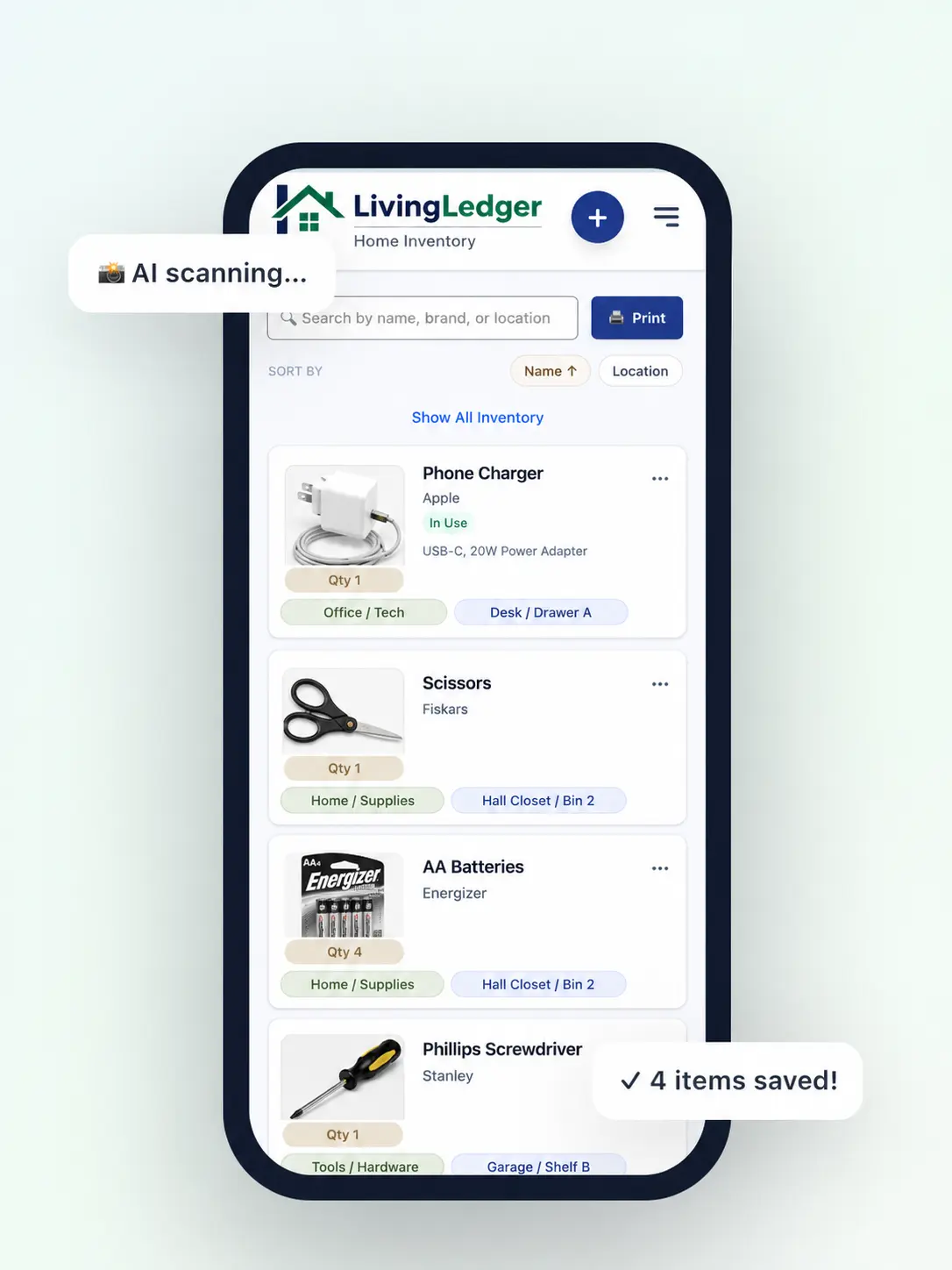
Typing every item into a spreadsheet is why most home inventories never get finished. You remember the idea when you are motivated, then stop when the work becomes too much. Two weekends in, you have one shelf logged and a long list of things still to type.
An AI home inventory app should reduce the manual work. With LivingLedger, you take photos, review item suggestions, save what matters, and build a searchable inventory without starting from a blank form every time. The AI does the first draft. You make the decisions. Think of it as a no-typing inventory app for households that have enough on their mind already — a household inventory tracker that helps you catalog household items without turning the process into a project.
What is an AI home inventory app?
An AI home inventory app uses photos to help identify visible household items and turn them into inventory entries. You can also think of it as a home inventory scanner app or AI inventory app: the camera does the looking, the AI does the suggesting, and you do the deciding. The goal isn’t to replace review — it’s to make the first draft faster. Instead of typing each item name by hand, you point your camera at a shelf or a box, and the app suggests what it sees.
With LivingLedger, the AI suggests item names and details from photos, then lets you review before saving. You can edit any suggestion, delete what’s not relevant, and ignore things you don’t want to track. AI item recognition isn’t perfect — it works on what’s visible in the frame — but the AI accelerates the boring part (typing) while you stay in charge of what ends up in your inventory.
How LivingLedger’s AI photo scanning works
Four steps. The AI handles the first draft. You stay in control at every step.
Take a photo
One clear shot of a shelf, drawer, storage bin, moving box, or group of household items. Pulling items to the front helps the app catch more of them.
Review suggested items
Each photo can suggest up to 10 visible items. Keep, edit, or ignore each one. The review step keeps the inventory honest.
Save items to a location
Add where the item lives, like Garage → Shelf A → Bin 2. Locations nest up to three levels deep.
Search later
Search by name, brand, note, category, or location. Walk straight to the right place instead of opening five wrong ones.
Each step matters. The workflow is the same in every space — closets, garages, moving boxes, pantries — and the photo-then-review habit is what makes the inventory build up over time.
What you can track with an AI home inventory app
The same photo-then-review habit works across every kind of household storage. A few common starting points:
- Storage bins: cables, tools, holiday decor, keepsakes — see the storage bin inventory guide for the full walkthrough.
- Moving boxes: kitchen items, office supplies, documents, clothes — the moving boxes guide covers packing-day workflow.
- Garage shelves: tools, paint supplies, hardware, extension cords.
- Pantry overflow: paper goods, cleaning refills, batteries, bulk items.
- Closets: seasonal clothes, linens, craft supplies, photo albums.
- ADHD or overwhelmed households: items that disappear when they are out of sight — the ADHD home organization guide covers why a photo-first workflow reduces overwhelm.
Why AI helps reduce inventory overwhelm
Starting is easier when the app suggests the first draft. There’s no blank form, no spelling out every item one by one, no decision fatigue about how to label things. The AI gives you something to react to, and reacting is always easier than writing from scratch.
For busy households — and for ADHD brains especially — that small shift matters. Less typing means less friction. Less friction means the habit can actually stick instead of dying on weekend two. The review step keeps you in control, so the inventory still reflects what you actually want to track. And once items are saved with a location, the constant low-grade anxiety of “where did I put it?” starts to fade. The app holds the map. You don’t have to. That is the real shift: the app remembers where things live, so you do not have to keep the whole house in your head.
AI scanning is helpful, but search is the real payoff
The goal isn’t just adding items faster. The payoff is being able to search later — before rebuying, before digging through boxes, before opening five drawers to find one charger. AI gets you to a useful inventory faster; search is what makes that inventory feel useful every day after.
If finding things is your bigger pain, how to stop losing things at home covers the same fix from the other angle. If duplicate purchases are the more expensive problem, how to stop buying things you already own walks through the search-before-you-buy habit.
FAQ
AI home inventory app FAQ
What is the best AI home inventory app for households?
There is no single best app for every household — the right one depends on how much typing you want to avoid and how much you actually need to find later. LivingLedger is built for households that want photo-based capture, searchable locations, and low setup friction. You take photos, review the suggestions, and save the items you actually want to track.
Can AI create a home inventory from photos?
It can help by suggesting visible items from photos, but you should review before saving. LivingLedger can suggest up to 10 visible items from one photo. You stay in control of what gets added to your inventory.
Do I have to type every item manually?
No. You can add items manually when you want, but AI photo scanning helps reduce typing by suggesting visible items from a photo. Manual entry remains useful for items the AI can’t see or for things you want to log without taking a picture.
Can I use this for moving boxes and storage bins?
Yes. LivingLedger works well for moving boxes, storage bins, garage shelves, closets, and other household storage areas. The workflow is the same in every space: take a photo, review the suggestions, and save with a location.
Is the free plan enough to start?
Yes. The Free plan includes unlimited manual items plus 50 lifetime AI photo scan credits. That is enough to test the workflow on the areas of your home that matter most.
Does the AI save items automatically?
No. LivingLedger shows suggestions for review before saving. This keeps you in control and helps avoid saving things you do not care about.
Build your home inventory faster.
Take photos, review AI suggestions, save item locations, and search later from your phone.
Free plan · No credit card required · Web app + iOS app