How to Inventory Estate Belongings
Sorting through a family member’s home means facing a lot of boxes — and the same question, over and over: what’s in these? A simple, searchable record lets you answer it once per box, at your own pace, without relying on memory.
If you’re reading this, you may be sorting through the home of someone who has died, or helping a relative move to a smaller place. Either way, the work is bigger than it looks from the outside, and it rarely happens in one weekend. This page is a practical method for one narrow part of it: knowing what’s in the boxes.
An estate inventory, in the sense we mean here, is something simple: a searchable list of the belongings you’re sorting, with a record of which box, shelf, or room each one is in. Not a valuation. Not a legal document. Just a way to stop holding the whole map in your head. LivingLedger is a home inventory app, and this is the use it was built for — you record where things are so you can find them again later.
Why the boxes are hard to keep track of
Sorting an estate is not like packing for a move. A few things make it harder to keep in your head:
A simple way to inventory estate belongings
Work one box or shelf at a time
There is no finish line you have to reach today. The record is useful from the very first box, and every box you add makes it a little more useful. If a session is one box, that’s a fine session.
Give each box a plain name
You don’t need a numbering system, just a handle you’ll recognize later: Kitchen Box 1, Study — Papers 2, Photos Box 3. Write the same name on the box itself.
Record what’s inside
Typing a handful of item names per box is often the calmest way to work, and manual items are unlimited on the free plan. When a box holds many visible items, one photo can speed things up: the AI scan suggests up to 10 items it can see in the picture, and you review the suggestions — renaming or removing anything — before saving. Nothing enters the record without your say-so.
Give every box a location
Locations nest up to three levels deep, which is enough to mirror how estates actually scatter:
- Mom’s House → Basement → Box 3
- Storage Unit → Back Wall → Box 12
- Our Garage → Shelf 2 → Photos Box 1
When a box moves — and boxes move — update its location in the record, and every search after that points to the new place.
Search when the question comes up
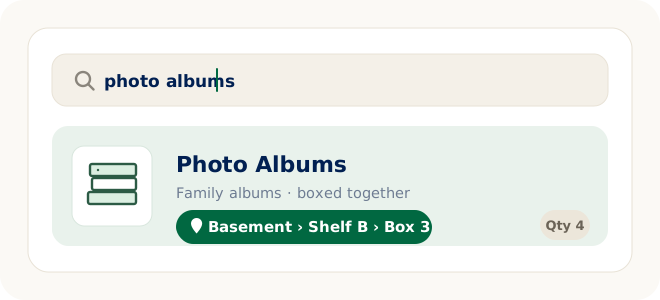
“Photo albums.” “Sewing machine.” “The good china.” Whether the question arrives next week or next year, you search the item and the record answers with the box and where it lives. You open one box — the right one.
What this record is — and what it isn’t
It’s worth being clear about the boundaries, because an estate involves things a home inventory app doesn’t do:
- It is a searchable record. Item names, categories, photos you choose to attach, and locations. Its one job is answering “where is it?”
- It is not an appraisal or legal tool. LivingLedger doesn’t estimate values and isn’t a probate, insurance, or estate-settlement product. If you need valuations, that’s a job for a professional appraiser.
- It is currently single-user. One person keeps the record and can answer questions from it. Shared household inventories are planned, but they aren’t available yet.
- Details live in the item name. There are no special fields for provenance or who-gets-what. If it matters, put it in the name — Grandma’s sewing machine is a perfectly good item name — and use categories to group things your own way.
Go at the pace the work allows
You don’t need to log everything. Record the things someone might ask about later — albums and photographs, documents, keepsakes, tools, specific kitchenware — and let the rest be. A box you seal and never think about again didn’t need an entry. The one you would otherwise re-open six times did.
If the boxes end up in long-term storage, the same record keeps working there — our guides to keeping track of moving boxes and storage bin inventory cover that side of it. And if you’re helping a parent downsize rather than settling an estate, the home inventory for seniors guide covers setting up a record together, in their home, while they can tell you the stories behind things.
FAQ
Estate inventory questions
How do I inventory estate belongings?
Work one box or shelf at a time. Give each box a plain name, record the items inside it, and save the box’s location — up to three levels, like Basement → Shelf B → Box 3. Later, search for the item by name and the record tells you which box it is in.
Do I have to record every item?
No. Record the things someone might look for later — photo albums, documents, keepsakes, specific kitchenware. A partial record that answers real questions is more useful than a complete one that never gets finished. Manual items are unlimited on the free plan.
Can my siblings or other family members share the inventory?
Not yet. LivingLedger is currently single-user — one person keeps the record and can answer questions from it. Shared household inventories are planned but are not available yet.
Does LivingLedger value or appraise items?
No. LivingLedger is a home inventory app: it records what an item is and where it is. It does not estimate values, and it is not an appraisal, probate, insurance, or estate-settlement tool. If you need valuations, that is a job for a professional appraiser.
Can I use it for boxes in a storage unit?
Yes. Locations nest up to three levels deep, so a storage unit works the same way as a house: Storage Unit → Back Wall → Box 12. The record does not care where a box lives — only that you saved its location.
Is LivingLedger free?
The free plan includes unlimited manual items, which covers most of an estate inventory, plus 50 lifetime AI scan credits — each AI photo scan uses 1 credit and can identify up to 10 items. For current Pro pricing, see the pricing page.
Know what’s in every box.
One box at a time, at your own pace. The record keeps the answers so you don’t have to.
Free plan · No credit card required · Web app + iOS app