How to Keep Track of Moving Boxes Without Opening Every Box
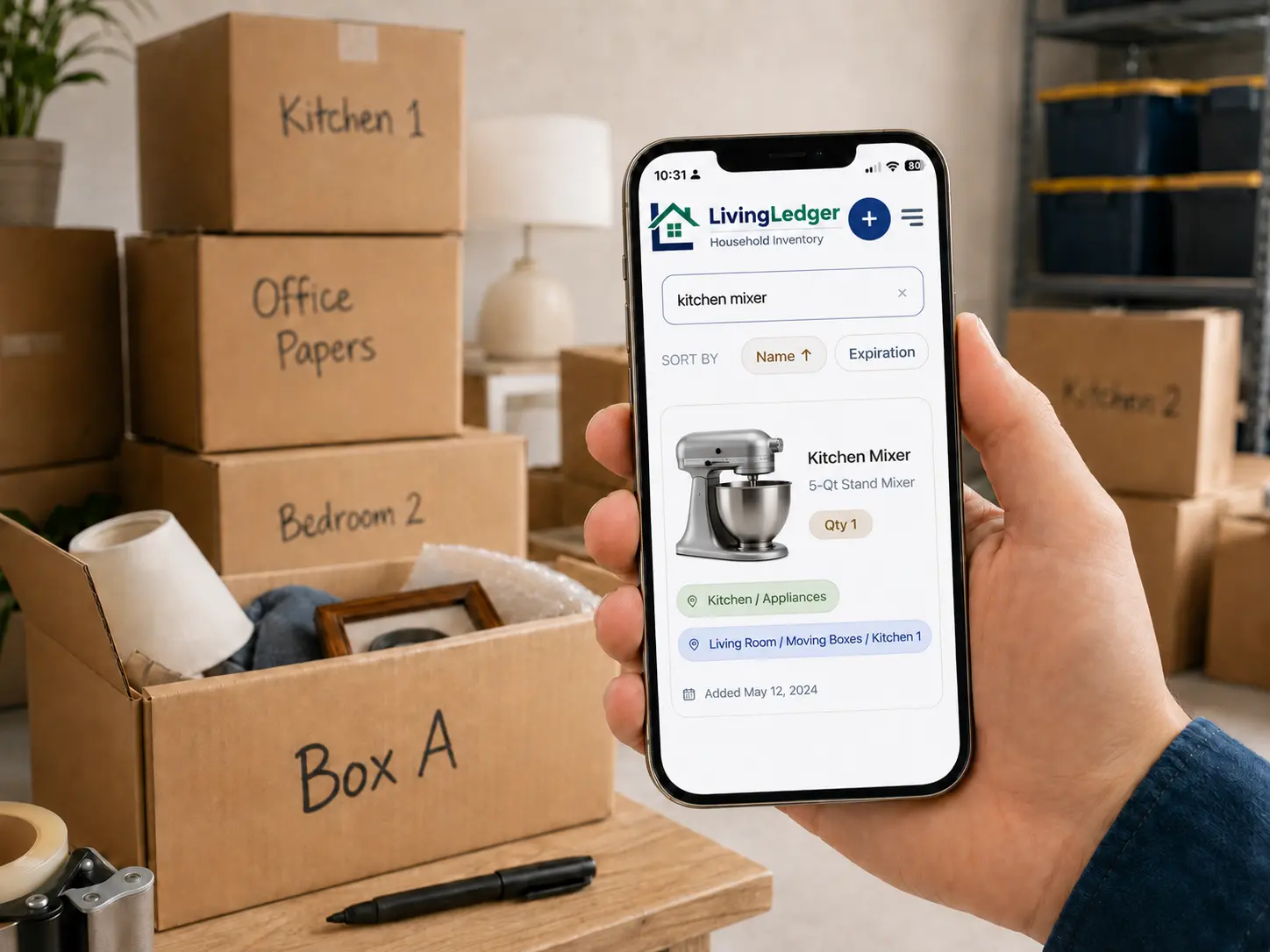
Moving boxes are easy to pack and hard to search later. The LivingLedger home inventory app helps you save what is inside each box, where the box lives, and find items without opening everything.
Two boxes packed. One search. The right box, every time.
- plates
- mugs
- coffee grinder
- router
- cables
- monitor stand
No tape cut. No wrong box opened. The router shows up where you packed it.
You know the HDMI cable, tax folder, winter gloves, or spare charger is packed somewhere. The problem is that “Office Stuff” written on the box does not tell you which box to open. So you open three or four to find one thing — or give up and buy another.
Take photos before you close the box. Each photo can suggest up to 10 visible items, so you are not typing every charger, cable, folder, mug, or kitchen tool one by one. You review the suggestions and save them to the box location.
Later, when you need the mixer, tax folder, HDMI cable, or winter gloves, you search instead of opening every box.
Why moving boxes become impossible to search
When you don’t track what is inside boxes — whether they’re moving boxes today or long-term storage box inventory tomorrow — finding one specific item turns into a guessing game. A few patterns explain most of it:
- Labels go vague under pressure. “Misc,” “Office,” “Kitchen 3” — labels that made sense on packing day stop meaning anything two months later.
- Boxes migrate. Some end up in the garage, some in the attic, some in a closet, some still in the spare bedroom. The label doesn’t move with you mentally.
- You remember categories, not contents. You know roughly where “office stuff” is, but not which of three boxes has the specific cable you need right now.
- Tape is annoying. Opening a box means cutting tape and resealing it, which is enough friction to make people skip the check entirely.
- Duplicate buying creeps in. When finding something feels harder than buying another one, the duplicate purchase wins. That’s how households end up with three HDMI cables and two coffee grinders.
A simple moving box inventory system
Give each box a simple name
You do not need a numbering system. Short, specific names work better than a perfect taxonomy. Examples: Box A, Kitchen 1, Garage Tools, Office Papers, Kids Winter Clothes. The name is just the handle you’ll search against later.
Take a photo before closing the box
Right before the tape goes on, lay the contents out so you can see everything, and take one clear photo from above. That single image is what your moving box tracker has to work with later, so make it count — even pulling a few things to the front so they’re visible is enough.
Save the important items inside
Open the photo in LivingLedger. The AI scan suggests up to 10 identifiable items from one image — chargers, books, tools, mugs, folders, whatever is visible. Review what it found, edit or delete anything that’s wrong, and save the items you actually want to be able to search for. You don’t have to log every spoon — log the things you’ll go looking for later.
Add the box location
Each item gets a location, and locations can nest up to three levels deep. A few real examples:
- Garage → Right Shelf → Box A
- Storage Unit → Back Wall → Kitchen 2
- Closet → Top Shelf → Winter Clothes
Once a box has a location, every item inside that box inherits the same path. You only set it once per box.
Search before opening boxes
This is where the system pays off. Need the HDMI cable? Search “HDMI cable” and the app tells you which box and which shelf. Same for “passport,” “extension cord,” “winter gloves,” “tax folder,” “coffee grinder.” You walk straight to the right box, cut tape once, and you’re done.
What to put in your moving box inventory
The goal is useful coverage, not complete coverage. Track the items you’ll actually want to find later:
- Electronics and cables (HDMI, USB-C, chargers, adapters)
- Documents (passports, tax folders, warranties, manuals)
- Kitchen tools (the specialty ones, not every fork)
- Seasonal clothes (winter coats, kids’ outgrown sizes)
- Kids’ items (specific toys, school supplies, art kits)
- Tools and hardware (drill bits, Allen keys, replacement parts)
- Medicine cabinet overflow (refills, sunscreen, first-aid extras)
- Sentimental items (photo albums, keepsakes, gifts)
- Chargers, adapters, and that one specific cable
- Small parts and replacement pieces (screws, batteries, fittings)
Do not inventory every spoon. Track what you will actually search for later, and let the rest sit happily in the box.
Moving box labels are helpful, but searchable inventory is better
A written label tells you the broad category. A searchable inventory lets you organize boxes without opening them — it tells you what is actually inside. The two complement each other: keep the marker label so you can see at a glance which category a box belongs to, then let the app remember the specific contents. You’ll thank yourself the first time you find something in seconds instead of an afternoon.
How LivingLedger helps with moving boxes
- Scan a box photo and review the AI’s suggestions before saving — you stay in control of what’s logged.
- Save item names alongside the box and its location, so the inventory always knows where to point you.
- Search later from your phone in the garage, or from your desktop in the office — same inventory, same answer.
- Start free with unlimited manual items and 50 lifetime AI photo scan credits.
- Keep using it for storage bin inventory and household drawers long after the move is finished — the same habit works.
Try it free with one box. If it helps you find one thing without opening five, you’ll see the value right away.
FAQ
Moving box questions, answered
What is the easiest way to keep track of moving boxes?
Use a home inventory app to save what is inside each box plus where the box lives. LivingLedger lets you take one photo of the open box, review the suggested items, and save them with a location. Later you search by item name instead of opening every box.
How do I know what is inside a box without opening it?
Take a photo of the contents before you tape the box shut, save the items in your inventory, and assign the box a location like Garage → Right Shelf → Box A. From then on you search the inventory by name and the app tells you which box to open.
Do I need to inventory every item in every box?
No. The goal is to log the items you will actually search for later — chargers, documents, tools, kids’ winter clothes, holiday decorations. Skip every spoon, every sock, every paperback. Useful coverage beats complete coverage.
Can I use LivingLedger after the move?
Yes. The same boxes become long-term storage in garages, closets, and basements, and the inventory keeps working. You can also add bins, shelves, and drawers as new locations once the boxes are unpacked.
Is this useful for storage units?
Yes. Storage units are exactly the kind of out-of-sight space where a searchable inventory pays off. Photograph each box before it goes in, assign a Storage Unit location, and search before you drive over there.
Can I start for free?
Yes. The Free plan includes unlimited manual items plus 50 lifetime AI photo scan credits, which is enough to cover the boxes that matter most. No credit card required to start.
Summary
The moving box problem is a search problem. Tape, vague labels, and migrated boxes make finding things harder than buying again. The fix is small: photograph the contents before the tape goes on, save the items that matter, give the box a location, and search later. That’s how you find items after moving without rummaging through every box you packed. Start free with LivingLedger and try it on one box first.
Packing up a relative’s home rather than your own? The estate inventory guide applies the same record to that slower, more careful kind of sorting.
Find what is inside every box.
Start with one box today. Save what is inside and search later when you need it.
Free plan · No credit card required · Web app + iOS app