Know What Curriculum You Already Own — and Where It Is
Many homeschool materials are kept and reused after the school year ends. They get boxed, stored, and pulled back out — sometimes four years later for a younger sibling. Save each thing and the place it went, then search the item next August instead of opening every bin.
Most household clutter is stuff you use or throw away. Homeschool material is different: much of it is bought once, used for a year, then deliberately kept — because a younger child will need it, because the answer key is still good, because a hundred dollars of manipulatives does not get thrown out. That makes homeschooling one of the few household situations where you go looking for the same object year after year, sometimes across a five-year gap.
Which is also why it fails in such a specific way. The problem is almost never “we don’t own it.” It’s “we own it, it is in this house, and finding it is going to cost an hour.” So the workbook gets reordered, the pattern blocks get rebought, and three weeks later the original set turns up behind the Christmas bins. The fix is not a better shelving system — it’s a record you can search, the same item-first habit that makes a home inventory app useful for everything else you own.
The questions that come back every August
These are retrieval questions, not organization questions. No amount of tidying answers them.
How it works
Photograph the shelf as you pack it
At the end of a unit or a year, lay the books and materials out and take one photo with the AI scan. One photo can recognize one item or up to 10, and the same flow works for a shelf, a cabinet, a bin, a storage area, or a single book. Prefer typing? Manual items are unlimited on every plan.
Review, and name things the way you’ll search
This is the step that makes it work. The scan proposes what it recognizes — it does not read titles off spines or covers — so you rename each item to the words you’ll actually type later: Level 2 phonics workbook — teacher edition. AI proposes; you confirm. Nothing is saved until you say so.
Save where it went
Give the material its spot, up to three levels deep: Attic → Curriculum bins → Grade 3. Everything going into that bin shares the location, so you set it once, not once per book.
Search the item, not the bin
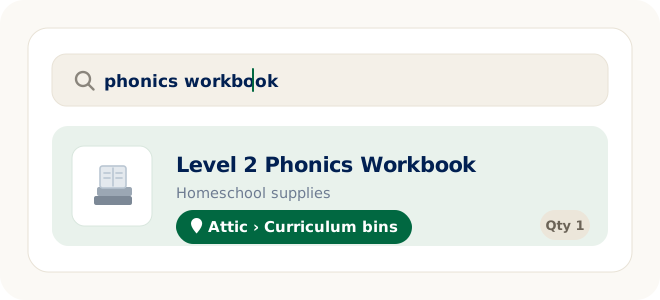
Next August, nobody remembers which tote. Everybody remembers “the phonics workbook.” Search for the item and it comes back with the location you saved — which is the whole point of writing it down while the box was still open.
Name it the way you’ll look for it
Search reads what you typed, so the item name is where the useful detail belongs. Four things are worth including while the book is still in your hand:
- The subject. This is what you’ll type — “phonics,” “fractions,” “chemistry.” It beats a publisher’s series name you won’t recall under pressure.
- The level or grade. “Level 2,” “Book B,” “Grade 4” — whatever the material itself calls it, because that’s what you’ll be matching against next year.
- Student or teacher edition. The distinction that costs the most when you get it wrong.
- Consumable or reusable. A workbook that gets written in can only serve one child; a hardcover reader can serve four. Knowing which is which decides whether you shop at all.
None of this needs a special template. It’s one honest item name, typed once, searchable from then on. Categories group the material and locations hold the where.
Where homeschool material actually lives
Locations nest up to three levels, which is enough to describe where things really sit without inventing a filing system nobody will maintain:
Attic → Curriculum bins → Grade 3
School room → Bookcase → Shelf 2
Closet → Math bin → Base-ten blocks
Office → File box → Portfolio
Why this beats a labeled tote and a good memory
- A label is container-first. “Grade 3 — Math/Science” on a lid only helps once you’ve already climbed into the attic and found that tote. It can’t answer “do we still own the fraction tiles?” from the kitchen table.
- The gap is measured in years. Material bought for one child and reused by another can sit untouched for four or five years — well past the point where memory stops being a system.
- The rebuy is expensive. Curriculum is not batteries. Replacing a set you already own is a real line item, and the sale that prompts it never leaves time to go check.
- Nobody should have to be the index. If one parent holds the whole map of what was used and where it went, planning stalls whenever that person is busy. That’s its own household problem.
- Selling and passing on gets easier. Knowing exactly what you own and where it is stored is what turns “we should sell the old sets” into something that actually happens.
Do it at the end of the year, not the start
The cheapest moment to record homeschool material is the day you pack it up — when you still know what got finished, what got skipped, what’s written in, and everything is already in one pile. Ten minutes then replaces an hour in August.
If the bins are already stacked and taped from years past, don’t stage a cleanout to fix it. Record one bin the next time you’re up there anyway, starting with the subjects a younger child will hit first — the same way a storage bin inventory gets built without a dedicated weekend.
FAQ
Homeschool supply questions
How do I keep track of homeschool supplies?
Save each workbook, teacher guide, and set of manipulatives as an item, named the way you will search for it, and save where it is stored — for example Attic → Curriculum bins → Grade 3. When the next school year starts, search for the item and LivingLedger shows the location you saved, instead of you opening six bins to find one book.
Does the AI read the titles off book spines and covers?
No. LivingLedger does not automatically capture titles from book covers, spines, or labels. The AI photo scan proposes items it recognizes in your photo; you review the suggestions, rename each one the way you will search for it, and save. AI proposes, you confirm.
Can one photo capture a whole shelf of curriculum?
One AI photo scan can recognize one item or up to 10 items, and the same flow works for shelves, cabinets, drawers, boxes, bins, storage areas, or a single book. You review what the AI finds, adjust anything if needed, then save. A shelf holding more than ten things takes a second photo.
Can my spouse or co-op see the same inventory?
Not yet. LivingLedger is currently single-user, and shared household inventories are planned but not available. Your inventory is tied to your account rather than to one device, so you can sign in on another supported phone or computer and see the same items — but it is one account, not a shared one.
How do I record the grade level or subject?
Put it in the item name. Search reads what you typed, so an item named Level 2 phonics workbook — teacher edition is findable by level, subject, or title. Categories group the material and locations record where it lives, nesting up to three levels deep, such as Basement → Shelf 2 → Math bin.
Do I have to use AI scanning to build this?
No. Manual inventory items are unlimited on every plan, and typing in a book takes about as long as reading its cover. AI photo scanning is a faster way to start a small group of items, not the only way in.
Is LivingLedger free?
LivingLedger is free to start. Manual inventory items are unlimited, and Free includes 50 lifetime AI scan credits — each AI photo scan uses one credit, and the credits do not reset or refill. Pro unlocks unlimited AI scanning for personal household use, subject to fair-use limits. See the pricing page for current plan details.
Next August, search instead of digging.
Start with the bin you packed most recently. Record it once — find it for as many years as you keep it.
Free plan · No credit card required · Web app + iOS app