Know Where the Decorations Are Next Year
Save what’s in each holiday bin and where it’s stored — while the bin is still open. Next season, search for the decoration and walk straight to the right bin, instead of hauling down every box to find one thing.
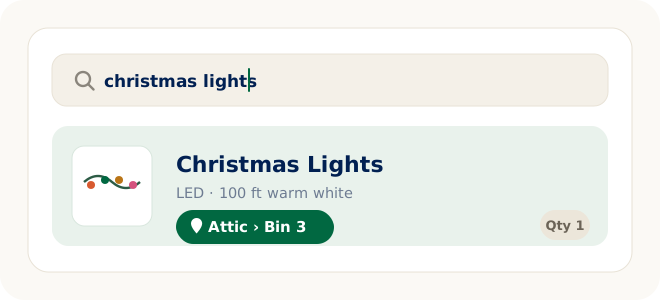
Decoration storage is a once-a-year memory test. The person who packs the bins in January knows exactly where everything went — for about a week. Eleven months later, a busier version of you is back in the attic or garage, opening identical holiday bins one by one, looking for the outdoor Christmas lights, extension cords, wreaths, ornaments, the tree stand, the tree skirt, timers, or yard stakes. The fix isn’t better labels or a better memory: you search for the item, and the answer is the bin you saved it to.
LivingLedger is a calm household inventory tool: record what’s inside each decoration bin, save where the bin lives, and search next season. It works the same way for holiday bins as for any other storage bin in the house — and as a general home inventory app for everything else you own.
How to Remember Where You Stored Your Christmas Decorations
To remember where you stored your Christmas decorations, take a photo of the open bin before you close it, review the suggested items, and save them to a clear location like Attic → Left Eave → Red Bin. Next year, search for Christmas lights, wreaths, ornaments, or the tree stand instead of opening every box.
Seasonal storage generates the same small mysteries every year, on schedule:
The Easiest Way to Organize Holiday Bins and Boxes
Save what’s in each bin
While packing up after the season — or the next time a bin comes down anyway — photograph the open bin with the AI Scan flow. One photo can recognize one item or up to 10, and the same flow works for bins, boxes, shelves, cabinets, and whole storage areas. Prefer typing? Manual items are unlimited on every plan.
Review before saving
AI suggestions are a first draft, not a verdict. You review what was recognized, rename anything (“outdoor lights, warm white” beats “string lights”), drop wrong guesses, and save only the items you’ll actually search for next year.
Save the storage location
Give the items their spot, up to three levels deep: Attic → Left eave → Red bin. Everything in that bin shares its location — set it once per bin, not once per item.
Search next season
Next December, type “outdoor lights” and see the location you saved. That’s the whole trick: LivingLedger shows you where something is because you recorded it — there are no tags, beacons, or automatic tracking. It’s your record, made searchable.
Map storage the way your home actually stores it
Locations nest up to three levels — enough to mirror where seasonal bins really live, without building a filing system nobody maintains:
Attic → Left eave → Red bin
Garage → Top shelf → Halloween bin
Basement → Metal rack → Lights box
Hall closet → Top shelf → Gift wrap
What to save from each bin
Log the things you go looking for, not every bauble. For most households that means: light strings (inside and outside), extension cords and timers, ornament boxes, the tree stand and skirt, wreaths and their hooks, inflatables and yard stakes, candle sets — and the switch-overs beyond December, like Halloween and fall decorations, Easter baskets, and birthday banners. One entry for “ornament box” beats forty entries for individual ornaments.
Why this beats labels and memory
The payoff is simple: instead of digging through heavy boxes to find holiday extension cords, timers, ornaments, or yard stakes, you scan a bin once, review and save the items with their location, then search the item name next season and walk straight to the right bin — whether it’s in attic storage or on the garage shelves.
- Labels are container-first. A bin marked “Holiday” claims a category; it can’t answer which bin has the tree topper. You search the item — the label just confirms you grabbed the right bin.
- The gap is nearly a year. A searchable record doesn’t fade between seasons — memory does.
- Fewer duplicate purchases. A ten-second search settles “do we own more lights?” before the store does.
- Decorating starts sooner. Day one is decorating, not attic archaeology.
- Nobody has to be the index. The answer to “where are the decorations?” lives in the record, not in one person’s head.
Start in the off-season — it’s easier
The best time to build a decoration inventory is whenever a bin is open. If it’s mid-year and everything is packed away, don’t haul bins down just to log them — capture each one the next time it comes down anyway. Pack-day is the one day you know exactly where everything is going; that’s the knowledge worth writing down while you still have it.
FAQ
Seasonal decoration storage questions
How do I remember where I stored the Christmas decorations?
Save each decoration with its storage location while the bin is still open — for example Attic → Left eave → Red bin. Next season, search for the item, like outdoor lights or the tree stand, and LivingLedger shows the location you saved. You search the item; the bin is just the answer.
Do I have to unpack every bin to build the inventory?
No. Log bins on their natural cycle: as you pack decorations away at the end of a season, or the next time a bin comes down anyway. Within one lap of the year, most seasonal storage becomes searchable — without a dedicated organizing weekend.
Can one photo capture a whole decoration bin?
One AI photo scan can recognize one item or up to 10 items, and the same flow works for bins, boxes, shelves, cabinets, drawers, and storage areas. You review what the AI finds, adjust anything if needed, then save. For a very full bin, a second photo covers the rest.
Does LivingLedger know where my bins are automatically?
No. There are no tags, beacons, or automatic location tracking. LivingLedger remembers the location you save for each item and shows that saved location when you search. If a bin moves to a new spot, update the location to keep the record honest.
Does this work for Halloween, fall, and other seasonal decorations?
Yes. The same save-and-search system works for any seasonal storage: Halloween and fall decorations, Easter baskets, birthday supplies, camping gear, and winter clothes. Anything you store between uses can be saved with a location and found again later.
Is LivingLedger free?
LivingLedger is free to start. Manual inventory items are unlimited, and Free includes 50 lifetime AI scan credits — each AI photo scan uses one credit, and the credits do not reset or refill. Pro unlocks unlimited AI scanning for personal household use, subject to fair-use limits. See the pricing page for current plan details.
Next season, search instead of digging.
Start with the bin you dread most. Save it once — find everything in it for years.
Free plan · No credit card required · Web app + iOS app