A handwritten notebook can work when you only need to track a few things that rarely move. It is free, familiar, and easy to start.
But once your home inventory spreads across closets, bins, shelves, drawers, seasonal storage, and garage spaces, a notebook starts to break down.
You cannot quickly search it. You have to flip through pages and hope the item was written down clearly.
It goes stale the moment something moves. A crossed-out line, a half-updated list, or a forgotten reorganization can make the whole system harder to trust.
And it usually stays at home. That means it cannot help when you are standing in a store aisle wondering whether you already have batteries, tape, cables, light bulbs, or extra supplies.
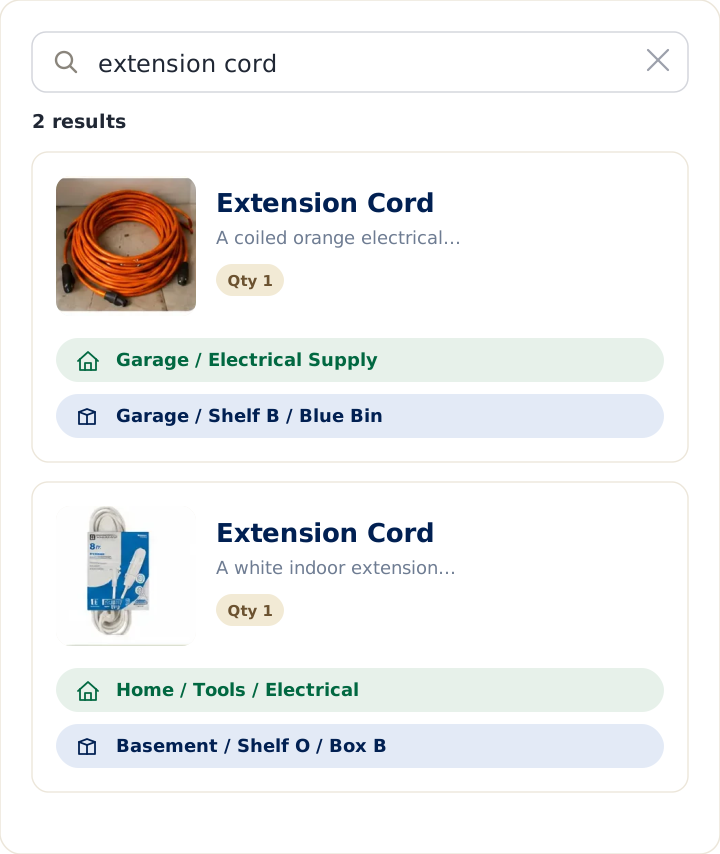
LivingLedger is built for the moment you ask, “Where did I put that?”
Instead of searching through pages, you search by item name and see where it lives in your home. Locations can be organized in simple nested layers, such as Garage › Shelf B › Blue Bin, so your inventory reflects how your home is actually arranged.
Instead of handwriting every item one by one, you can use AI-assisted photo scanning to draft multiple items from a shelf, cabinet, drawer, or storage box, then quickly review and save them.
And because LivingLedger is available on your phone, your home inventory can come with you — while shopping, organizing, packing, decluttering, or helping someone else find something.
A notebook records what you once knew.
LivingLedger helps you find what you still own.
Quick answer
Keep the notebook if you’re tracking a dozen things that rarely move. It’s free, instant, and there’s nothing to set up.
Switch to LivingLedger the moment your “somewhere safe” spots outgrow your memory — multiple bins, a full garage, a move, a season of decorations. You search the item’s name and it tells you where it is, it updates as you go, and it’s in your pocket at the store. (More on the LivingLedger home inventory app.)
Notebook vs LivingLedger: at a glance
| Notebook | LivingLedger | |
|---|---|---|
| Cost | Free, no setup | Free to start |
| Find an item | Flip through pages | Search any item in seconds |
| Staying current | Goes out of date | Updates as you go |
| At the store | Usually left at home | Available on your phone |
| Adding items | Handwrite each one | Optional photo to add fast |
| Locations | Whatever you scribble | Nest up to 3 levels deep |
When a notebook is genuinely fine
If you’re tracking a dozen things that rarely move, a notebook is perfectly fine — don’t overthink it. The notebook starts costing you the day your “somewhere safe” spots outnumber what your memory can hold: multiple bins, a full garage, a move, or a season of decorations you only see once a year.
From notebook to searchable in minutes
A notebook is easy to start, but hard to keep updated once your home inventory grows.
LivingLedger helps you move from paper notes to a searchable home memory without spending your weekend typing everything by hand. Take photos of shelves, cabinets, drawers, storage bins, or storage areas, and AI-assisted photo scanning can help recognize up to 10 household items from a single image.
You can still add or edit anything manually, but photo scanning makes the first inventory feel lighter — especially when you are starting with closets, garage bins, pantry shelves, or supplies you have been meaning to organize for months.
-
Step 1
Take photos
Take a photo of a shelf, cabinet, drawer, or storage bin.
-
Step 2
Review items
LivingLedger helps identify household items so you can review and adjust before saving.
-
Step 3
Save
Add the items you want to keep in your inventory.
-
Step 4
Find it later
Search by item name instead of flipping through pages.
Keep the instinct, lose the friction
The notebook was the right idea: give your home a memory. LivingLedger just makes that memory searchable, current, and always in your pocket. Start with one shelf — add a few items, search for one, and feel the difference.
Start free No credit card required.
Frequently asked questions
What is a good alternative to a "Where Did I Put That?" notebook?
A searchable home app like LivingLedger. Instead of flipping through pages, you type the item's name and it tells you where you put it — the bin, shelf, drawer, or room. It updates as you go, so it never falls out of date the way a paper notebook does, and it's in your pocket at the store so you don't buy a second one.
Is a notebook good enough for keeping track of what I own?
For a dozen things that rarely move, a notebook is perfectly fine. It starts costing you the day your safe spots outnumber what your memory can hold — multiple bins, a full garage, a move, or a season of decorations you only see once a year. At that point a notebook isn't searchable, goes stale the moment you move something, and is never with you when you need it.
Is LivingLedger free?
Yes. LivingLedger's free plan includes unlimited manual items, so you can record your whole home by hand at no cost, plus 50 lifetime AI scan credits if you want to add items by photo. Pro unlocks unlimited AI scanning for personal household use, subject to fair-use limits. See the pricing page for current plan details.
Do I have to type in every item?
No. You can jot items in seconds, or use an AI photo scan — each photo can identify up to 10 items at once, and each scan uses 1 credit. Review what AI finds, adjust anything if needed, then save. Adding items by photo is one tap when you want it.
Related comparisons
Weighing other ways to keep track of what you own? These guides compare the common alternatives:
- Compare all home inventory methods — the full comparison hub
- Home inventory spreadsheet vs. app — the brand-neutral overview
- Excel vs. LivingLedger
- Google Sheets vs. LivingLedger
- Apple Notes vs. LivingLedger
- Notion vs. LivingLedger
Still deciding? The LivingLedger FAQ answers common questions about how it works.