Most people don't start with a home inventory app. They start with a spreadsheet — or the thought of one. You misplace something one too many times, decide to finally get organized, and open a blank sheet with a burst of motivation. The real question, the one that keeps people stuck, is simple: is a spreadsheet good enough, or do I need an actual app?
The honest answer is "it depends" — but not on the things people usually weigh. It rarely comes down to features. It comes down to whether you'll still be using the thing in three months, and whether it can answer you in the moment you're actually standing in the garage. This guide compares the two approaches — the spreadsheet approach and the home inventory app approach — so you can pick the one you'll keep, and find what you already own instead of rebuying it.
We'll keep this brand-neutral. The goal is to help you choose an approach, then point you to deeper comparisons if you want to weigh specific tools.
First, the only thing that actually matters
Before comparing features, it helps to name the real job. People rarely lose things because they don't own them. They lose them because they can't remember where they put them. So the measure of any home inventory — spreadsheet or app — isn't how much it can store. It's how reliably it answers one question: where is it?
That reframes the whole comparison. A beautiful spreadsheet with forty columns that you stopped updating in February is worse than a scrappy list you actually keep current. The best tool is the one that survives contact with your real, busy life.
The two approaches, defined
The spreadsheet approach means tracking your household belongings in Excel, Google Sheets, or a similar grid of rows and columns. You design the structure, type in your items, and search or filter when you need something. It's free or nearly free, completely flexible, and familiar to almost everyone.
The home inventory app approach means using a tool built specifically to track what you own and where it is. Apps tend to be mobile-first, put location and photos at the center, and reduce the typing that sinks most spreadsheets. They trade some of the spreadsheet's open-ended flexibility for a smoother path to the one thing you actually need: finding stuff.
Neither is universally better. They suit different people and different goals.
Spreadsheet vs app: side-by-side
| What matters | Spreadsheet | Home inventory app |
|---|---|---|
| Cost | Free (Google Sheets) or included with Office | Often free tier; paid plans for extras |
| Flexibility | Maximum — any column, any formula | Focused on items, locations, photos |
| Getting started | Build your own structure first | Add items right away |
| Adding items | Manual typing, row by row | Type, or capture with a photo |
| Photos | Awkward to embed | Built in, one per item |
| Finding an item | Ctrl+F or filter | Search by name, on your phone |
| Locations | Only if you build and maintain the column | Central to every item |
| On your phone | Possible but fiddly | Designed for it |
| Analysis and totals | Excellent | Usually limited |
| Staying current | Depends entirely on your discipline | Lower effort to keep updated |
| Best at | Custom tracking and number-crunching | Finding everyday items fast |
When a spreadsheet is the better choice
Spreadsheets are genuinely the right answer for a lot of people. Choose the spreadsheet approach if:
- Your goal is analysis, not retrieval. If you mainly want to total the value of what you own, build an insurance schedule, or run calculations, spreadsheets are excellent and apps usually aren't.
- You like building your own system and you'll actually maintain it. Some people find upkeep satisfying rather than draining. If that's you, lean in.
- You need unusual, custom fields or complex multi-column sorting that a focused app deliberately keeps simple.
- Your list is small and stable. A few dozen items that rarely move won't go stale, so the spreadsheet's biggest weakness barely applies.
- You want to own the file outright in a format you can keep forever, no account required.
There's no shame in a free, familiar tool. A well-kept spreadsheet beats a half-used app every time.
When an app is the better choice
The app approach tends to win when the job is finding things rather than analyzing them. Choose an app if:
- Your real problem is retrieval. You own it; you just can't remember where it is. Apps put location and search front and center.
- You've abandoned a spreadsheet before. This is the most common story, and it's not a discipline failure — it's a friction problem. If manual upkeep beat you once, it will again.
- You need the answer on your phone, in a store aisle or a closet, not at a desk later.
- You're tracking a lot of items, or items that move between bins and seasons, where staying current matters most.
- You want to spend less effort, not more. Capturing an item with a photo is faster than typing a row, which is why app inventories tend to stay alive longer.
What actually decides success (it's not the tool)
Here's the uncomfortable truth behind every "spreadsheet vs app" debate: the tool matters far less than three things that have nothing to do with features.
- Friction per item. Every second it takes to add or update something is a tax you pay forever. High friction is why ambitious spreadsheets die. Low friction — type a name, snap a photo — is why some systems survive.
- Where it lives. The moment you need an answer is almost always away from your desk: at the hardware store, in the attic, mid-search. A tool that can't answer you there can't prevent a duplicate purchase or end a hunt, no matter how complete it is.
- How specific your locations are. "Garage" is a room, not an answer; you'll still open every bin. "Garage → Shelf B → holiday bin" is findable in one trip. Whatever tool you use, location specificity is where the value actually lives.
Get those three right and almost any tool works. Get them wrong and the fanciest app gathers dust just like the spreadsheet did.
What's changed by 2026
A few years ago, the spreadsheet-vs-app choice was closer, because early inventory apps mostly just replaced typing-in-a-grid with typing-in-a-form. That's no longer the whole picture.
- Photo capture lowered the cost of entry. The single biggest reason home inventories die is the tedium of manual entry. Modern apps let you add items by photographing a shelf or a bin and reviewing what's recognized, which removes most of the typing. This is the real shift — not "AI" as a buzzword, but a genuinely lower-effort way to get items in so the list stays alive.
- Mobile-first became the default. With search in your pocket, the inventory is finally there in the moment you need it — which is the whole point.
- Cloud sync made sharing normal. Households can keep one shared, current picture instead of one person guarding a file.
None of this makes spreadsheets obsolete. It does mean the app approach has closed its old weakness — setup and entry effort — while keeping its advantage in retrieval. If the last time you tried an inventory app was years ago, the experience is meaningfully different now.
How to choose: a quick gut check
Answer these honestly:
- Do you want to find things, or analyze them? Find → app. Analyze → spreadsheet.
- Have you abandoned a tracking spreadsheet before? Yes → app. No → either.
- Will you need answers on your phone, away from your desk? Yes → app.
- Do you enjoy building and maintaining your own systems? Yes → spreadsheet is viable.
- Is your list small and stable, or large and shifting? Small/stable → spreadsheet. Large/shifting → app.
If your answers lean toward finding, phone, and "I've quit a spreadsheet before," the app approach will likely serve you better. If they lean toward analysis and DIY control, the spreadsheet is a perfectly good home.
A note on cost
Cost is rarely the deciding factor, but it's worth being clear. Spreadsheets are free with Google Sheets or included if you already pay for Microsoft Office. Most home inventory apps offer a free tier that covers everyday use, with paid plans (often a few dollars a month) for extras like additional photo scanning. For pure out-of-pocket cost, spreadsheets win — but the truer "cost" of a spreadsheet is the time and discipline to keep it current, which is exactly what apps are built to reduce.
Frequently asked questions
Is a spreadsheet good enough for a home inventory?
For many people, yes — especially if your list is small, your goal is analysis or insurance documentation, and you'll keep it updated. A spreadsheet stops being good enough when entries go stale, you can't easily check it from your phone, or the upkeep becomes more effort than you'll sustain. If you've started and abandoned one before, that's the signal a lower-friction app may fit your life better.
What's the difference between a home inventory spreadsheet and an app?
A spreadsheet is a flexible, do-it-yourself grid you design and maintain; an app is a purpose-built tool that centers items, locations, photos, and search. Spreadsheets win on flexibility and analysis; apps win on speed of entry, mobile access, and reliably answering "where is it?"
Are home inventory apps worth it?
They're worth it if your real problem is finding things and keeping the list current — the two areas where spreadsheets most often fall down. They're less compelling if you mainly need totals, custom analysis, or a file you fully control, where a spreadsheet does more.
How do I keep a home inventory from going out of date?
Reduce the effort of updating it and keep it somewhere you'll actually open. Update at the moment you move something rather than "later," record specific locations, and don't over-engineer the structure. Staleness is almost always a friction problem, not a willpower problem.
Do I really need photos in my home inventory?
You don't strictly need them, but they help. A photo is faster to recognize than a description and settles "is this the one?" questions instantly. Photos are awkward in spreadsheets and built into most apps, which is one of the clearer practical differences between the two approaches.
Will a home inventory stop me from buying duplicates?
Only if it's with you when you shop. The reason people rebuy things isn't carelessness — it's that the list isn't in their pocket at the store. A mobile-first system you can search from the aisle is what actually prevents the duplicate purchase.
Where LivingLedger fits
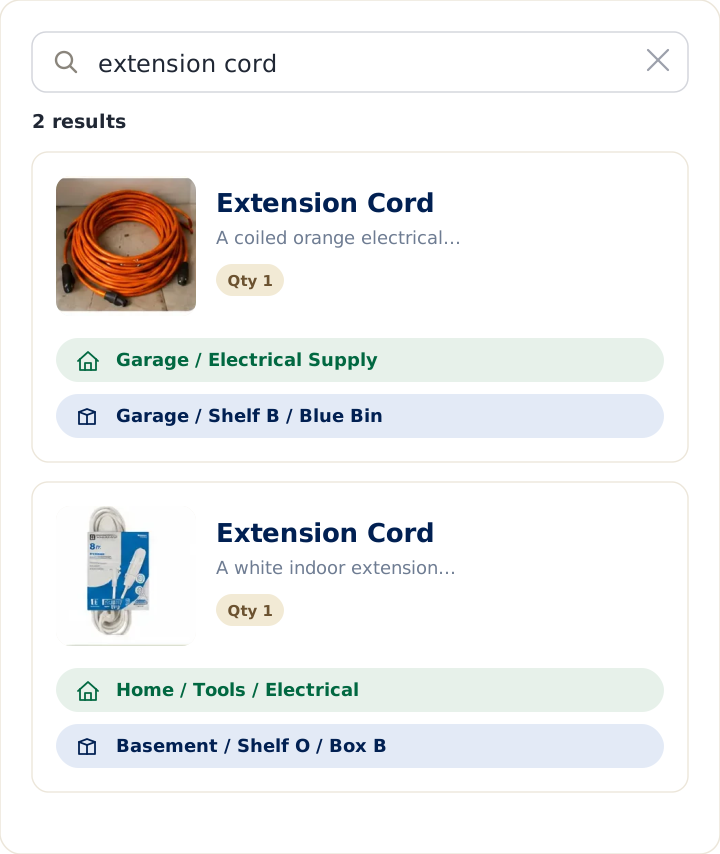
LivingLedger is one example of the app approach, built specifically around the "where is it?" job: you add an item by typing or photo, tag exactly where you put it, and later search the item's name to see its location. If after reading this you think the app approach fits your life, it's a free way to test that — add a few of the things you're always hunting for and search for one.
If you want to weigh specific tools rather than approaches, these comparisons go deeper:
- Excel vs. LivingLedger
- Google Sheets vs. LivingLedger
- Apple Notes vs. LivingLedger
- Notion vs. LivingLedger
- Notebook vs. LivingLedger
- Sortly vs. LivingLedger
Thinking of switching?
Don't rebuild your entire home in one weekend. Start with the 20 or so items you search for most often, and add the rest naturally as you use them. Starting small is the whole point — a calm system you actually keep beats a complete one you abandon.
The bottom line
There's no universal winner in spreadsheet vs app — there's only the tool you'll keep using. If you love building your own system, mostly need analysis, or track a small, stable set of things, a spreadsheet is genuinely a fine home inventory. If your honest problem is losing track of things you already own, and especially if you've quit a spreadsheet before, an app's lower entry effort and phone-first search will likely serve you better in 2026.
Either way, judge your choice against one question: when you're standing somewhere in your home wondering where you put something, will this tool actually tell you? Pick the one that answers "yes," and you'll stop searching for things you already own.
Start free No credit card required.