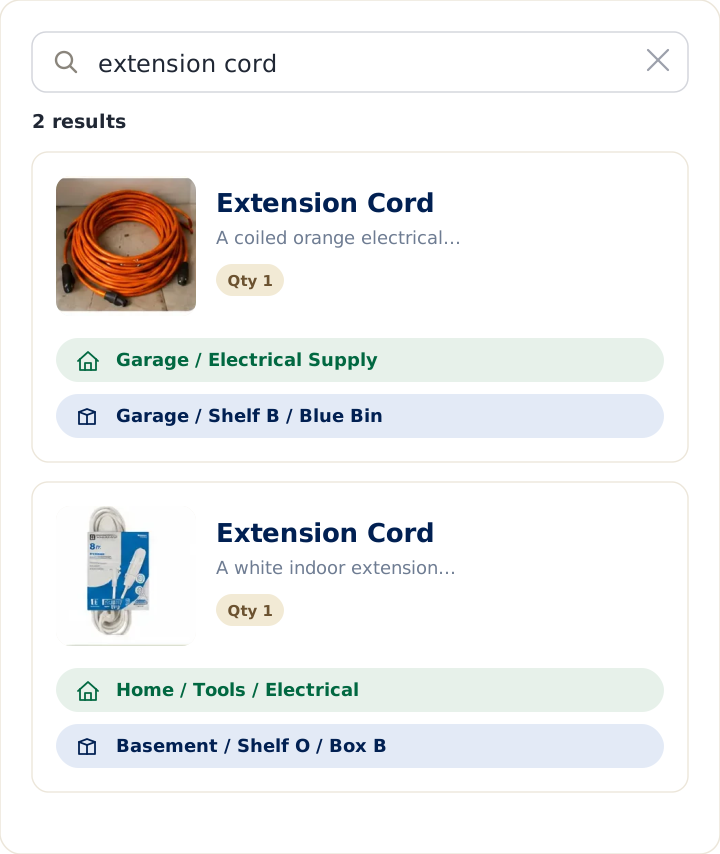
People rarely lose things because they don't own them. They lose them because they can't remember where they put them. So when it happens one too many times, most people don't go looking for inventory software — they open the app that's already on their phone and jot it down. For millions of iPhone owners, that app is Apple Notes.
Apple Notes is a fast, frictionless place to capture what you own. It's free, it's already there, and adding a photo takes a tap. But capturing a note and being able to find an item later are two different things, and the gap between them is where a quick note tends to fall short as a home inventory. This guide compares using Apple Notes to track household items against LivingLedger, a household inventory app built around one job: helping you find things you already own by remembering exactly where you put them.
If you keep lists in your phone and they keep growing into a mess you can't search, this comparison is for you. For the broader question of notes and lists versus a dedicated tool, the spreadsheet-vs-app overview is a good companion; this article focuses on what Apple Notes does uniquely well — instant capture — and where that leaves gaps for a home inventory.
Quick answer
Choose Apple Notes if you want a free, zero-setup place to jot down a small number of household items, you live entirely in the Apple ecosystem, and quick capture matters more than structured search.
Choose LivingLedger if your goal is finding household items quickly, remembering the exact location of each one, and keeping a growing home inventory searchable — without it turning into a wall of text.
Who each tool is really for
Apple Notes is a free note-taking app built into every iPhone, iPad, and Mac. Its strength is speed and simplicity: open it, type or dictate, attach a photo, done. It syncs across your Apple devices through iCloud and is wonderful for quick, unstructured capture — a grocery list, a thought, a photo of where you parked.
LivingLedger is purpose-built to remember what you own and where it is. You add an item, tag where you put it, and later search the item's name to see its location. It's designed for busy households, for reducing mental load, and for the moment you actually need an answer — usually on your phone, in the garage or the store. It works as a native iOS app and as a web app in modern browsers.
Neither is better in the abstract. A note is for capturing; an inventory is for retrieving. Here's the honest comparison.
Apple Notes vs LivingLedger: side-by-side
| What matters | Apple Notes | LivingLedger |
|---|---|---|
| Cost | Free on Apple devices | Free plan available. Pro unlocks unlimited AI scanning for personal household use, subject to fair-use limits. |
| Already on your device | Yes, on iPhone/iPad/Mac | App install or web app |
| Quick capture | Excellent — type, dictate, snap | Fast; type or photo scan |
| Photos | Excellent — attach in a tap | Built in, one per item |
| Structured locations | None — you type it into the text | Central to every item, nested |
| Finding a specific item | Search returns whole notes | Search returns the item and its location |
| Organizing many items | Folders and notes, manually | Structured automatically |
| Works on Android/Windows | Best inside the Apple/iCloud ecosystem | iOS app and web app (any modern browser) |
| Scales to hundreds of items | Gets unwieldy | Built to stay searchable |
| Keeping it current | Easy to add, hard to keep organized | Add and update as you go |
| Best at | Fast, casual capture | Finding everyday household items |
Why people start with Apple Notes
It's a genuinely sensible first choice, and it does several things better than a spreadsheet ever will:
- It's already in your pocket. No install, no account, no setup. The lowest-friction tool is the one you already have open.
- Capture is instant. Type it, dictate it, or use the camera. When you're standing in front of a bin, you can record what's in it in seconds.
- Photos are effortless. This is a real advantage over spreadsheets. Snap a picture of an item or a shelf and it's right there in the note, no fiddling.
- It syncs across your Apple devices. Add something on your phone, see it on your Mac, through iCloud.
- It's free. Nothing to buy, nothing to evaluate.
- It's flexible. Checklists, tables, folders, sketches — you can shape a note however you like.
For jotting down a handful of household items, Apple Notes is quick, free, and perfectly capable. The instinct to use it is the right one: you're trying to give your home a memory, and Notes is the nearest tool.
How to use Apple Notes as a home inventory
If Notes is your tool, a little structure makes it far more findable later:
- Decide on one approach and stick to it. Either one master note for everything, or one note per room or bin. Mixing both is how it becomes chaos.
- Use the table feature to give each item a row with columns for the item and its location, so it's not a free-form paragraph you have to read top to bottom.
- Always write the location next to the item — and be specific. Notes has no dedicated location field, so the only way it remembers where something is is if you type it in every time.
- Use folders for big categories (Garage, Holiday, Tools) so you're searching a smaller pile.
- Attach a photo when a picture would settle "is this the one?" faster than words.
This works for a modest list. The trouble starts as the list grows — which is the next section.
What information should every home inventory include?
Whatever tool you use, a useful household inventory comes down to a short list: what the item is (specific enough to search), where it is (the most valuable and most-skipped field), a photo or visual cue, and quantity. Value and purchase date matter only if your goal includes insurance or analysis. The Excel guide covers this in more depth, but the hierarchy is always the same: name and location do almost all the work, and location is the one a quick note most often leaves out.
How detailed should your locations be?
A location should be specific enough to find the item in one trip. "Garage" is a room, not an answer — you'll still open every bin. "Garage → Shelf B" or "Attic → Holiday bins → Bin 3" is findable. A good location usually has the room, the zone, and the container.
This is exactly where a note struggles. Apple Notes has no concept of a location, so any structure lives only in the words you remember to type and the consistency you remember to keep. LivingLedger makes location a built-in, nestable field on every item — up to three levels deep — so "where is it?" is always answerable, in the same format every time. The shift is the same one that matters everywhere: you stop trying to remember the box and start trusting the system. You search the item, not the box.
Where Apple Notes begins to fall apart for household inventory
The trouble isn't capture — Notes is great at that. It's retrieval, and it shows up as the list grows:
- Search returns notes, not items. When you search "drill" in Apple Notes, it surfaces every note that mentions a drill and drops you into a wall of text to scan. It doesn't tell you "Cordless Drill — Garage → Shelf B." You still have to find the line yourself.
- There's no structure to lean on. Without real fields, a long note becomes a paragraph you read top to bottom, and many notes become a folder you click through. Neither is fast when you're standing in the garage.
- Locations are only as good as your typing. Miss the location once, or write it three different ways, and the note can't reliably tell you where the item is.
- It gets unwieldy at scale. A dozen items is fine. Two hundred items spread across notes and folders is genuinely hard to keep organized, and the effort of tidying it is what makes people stop.
- It's Apple-centered. If someone in your household uses an Android phone or a Windows PC, a shared Notes-based inventory becomes less practical than a browser-based system everyone can access.
None of this makes Apple Notes a bad app. It makes it a capture tool being asked to do a retrieval job. It's brilliant at getting information in; it was never designed to answer "where is my extension cord?" on demand.
Common mistakes when tracking household items
These apply in any tool, and avoiding them matters more than the tool:
- Trying to inventory the whole house at once — start with a shelf or the twenty things you always hunt for.
- Vague locations — if a guest couldn't find it from your note, it's too vague.
- Letting it go stale — a list you don't trust is one you stop checking.
- Choosing a tool that can't answer you in the moment — the question comes up in a store or a closet, not at a desk.
- Over-organizing — elaborate folder systems feel productive but raise the cost of every entry until you quit.
The genuine strengths of LivingLedger
LivingLedger is narrower than Apple Notes on purpose. It doesn't try to be a notebook or a sketchpad. It tries to make sure that when you need something, you can find it. The value shows up in outcomes, not features.
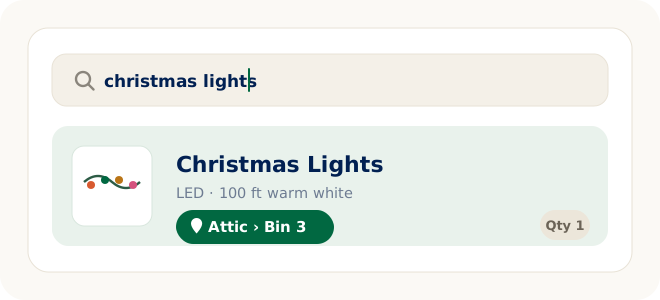
- A searchable memory for your home. Instead of remembering which note the Christmas lights are in, you remember that LivingLedger knows. Type "christmas lights," see "Attic → Bin 3," and go straight to it. You search the item, not the box.
- Search returns the item, not a wall of text. A query gives you the thing and its exact location, not a note to read through.
- Exact storage locations, built in. Locations nest up to three levels deep, in a consistent format on every item — no remembering to type it a certain way.
- Adding items takes seconds. Type an item in, or take a photo and let the app suggest what it sees. One AI photo scan can identify up to 10 items at once, and you review what it finds, adjust anything, and save. The free plan includes 50 lifetime AI scan credits, with one credit per photo scan, and manual entry is always unlimited.
- It reduces mental load. You stop carrying the map of your whole house in your head — part of why LivingLedger works well for ADHD-friendly organization.
- It works beyond Apple, too. Alongside the native iOS app, the web app runs in modern browsers, so household members on Android or a PC can use it as well.
The goal isn't to build a perfect catalog of everything you own. It's to stop losing Saturday afternoons opening every storage bin looking for one thing you know you bought.
Who should keep using Apple Notes
Be honest about your needs. Apple Notes is the better choice if:
- You're tracking a small, casual set of household items and quick capture matters most.
- Everyone who needs the list is in the Apple ecosystem.
- You value zero setup and a tool that's already on your phone.
- You mostly want a place to jot and attach photos, not to run searches across hundreds of items.
- Your current note works for you. If it does, there's no need to change.
For light, low-volume tracking on Apple devices, Notes is free, fast, and perfectly fine.
Who is likely happier with LivingLedger
LivingLedger is probably the better fit if:
- Your real problem is finding things — you own it, you just can't remember where it is.
- Your notes have grown into a wall of text you can't search efficiently.
- You want search that returns the item and its location, not a note to scan.
- You need consistent, built-in locations instead of hoping you typed them the same way each time.
- Someone in your household is not on Apple devices.
- You want to reduce the mental load of remembering where everything lives, and stop buying duplicates.
If "I know I wrote it down somewhere" is a sentence you say a lot, that's the problem LivingLedger is built to end.
A note on cost and availability
Apple Notes is free and built into Apple devices, syncing through iCloud — but it works best inside the Apple ecosystem. LivingLedger has a free plan with unlimited manual items and 50 lifetime AI scan credits, so you can track your whole home by hand at no cost and use photo scanning when it helps. Pro unlocks unlimited AI scanning for personal household use, subject to fair-use limits. LivingLedger is available as a native iOS app through the Apple App Store and as a web app in modern browsers, including iOS Safari, Android Chrome, and desktop Chrome and Edge — so you can sign in on any supported device and access the same inventory. LivingLedger is currently single-user; shared household inventories are planned but are not available yet.
Frequently asked questions
Can I use Apple Notes as a home inventory?
Yes, especially for a small number of household items. Apple Notes is excellent at quick capture and attaching photos, so jotting down what's in a bin is fast. It works best if you keep a consistent structure — a table with item and location columns, or one note per room — and always record where each item is. The limitation is retrieval: as the list grows, searching returns whole notes rather than a specific item and its location.
Is Apple Notes good for tracking where things are?
It can be, but only if you type the location next to every item and keep it consistent, because Notes has no dedicated location field. A purpose-built home inventory app makes the location a structured part of every item, so "where is it?" is always answerable in the same format.
What's the difference between Apple Notes and a home inventory app?
Apple Notes is a flexible capture tool; a home inventory app is built around items, locations, photos, and search. Notes wins on instant, low-friction capture and easy photos. An app wins on structured locations and on search that returns the exact item and where it is, rather than a note to read through.
Does Apple Notes work on Android or Windows?
Apple Notes is designed around the Apple ecosystem and syncs through iCloud. For a household that includes Android phones or Windows PCs, a shared note-based inventory is less practical than a browser-based tool. LivingLedger works on the web and iOS. Sign in with the same account on another supported device to access the same inventory. LivingLedger is currently single-user; shared household inventories are planned but are not available yet.
How do I keep an Apple Notes inventory from becoming a mess?
Pick one approach (a master note or a note per room) and stick to it, use the table feature so items have rows, always include a specific location, and use folders for big categories. Even then, the bigger the list grows, the more upkeep it takes — which is the main reason note-based inventories tend to drift over time.
Does LivingLedger require me to type in everything by hand?
No. You can type items in manually — unlimited on every plan — or take a photo and let the app identify what it sees, up to 10 items per photo. You review the results, adjust anything, and save.
Is LivingLedger free?
There's a free plan with unlimited manual items and 50 lifetime AI scan credits. You can run a complete home inventory on the free plan by adding items manually. Pro unlocks unlimited AI scanning for personal household use, subject to fair-use limits, and your saved items remain available even if you stop paying for Pro.
Will a home inventory really stop me from buying duplicates?
It helps, because it puts the answer in your pocket. People rebuy things not from carelessness but because the list isn't with them at the store. When you can search an item from the aisle and instantly see that you already own it — and where — the duplicate purchase simply doesn't happen.
Related comparisons
Weighing other tools? These companion guides compare the common ways people keep track of household items:
- Home inventory spreadsheet vs. app — the brand-neutral overview
- Excel vs. LivingLedger — for desktop spreadsheet users
- Google Sheets vs. LivingLedger — for shared, cloud spreadsheet users
- Notion vs. LivingLedger — for people building their own system from a template
- Notebook vs. LivingLedger — the pen-and-paper starting point
- Sortly vs. LivingLedger — for those considering a dedicated inventory app
Thinking of switching?
Don't rebuild your entire home in one weekend. Start with the 20 or so items you search for most often, and add the rest naturally as you use them. Starting small is the whole point — a calm system you actually keep beats a complete one you abandon.
The bottom line
If you keep a short list of household items in Apple Notes and it works for you, keep it. Notes is free, instant, and genuinely great at quick capture and photos — for low-volume tracking on Apple devices, it's hard to beat on convenience.
But if you recognize the more common story — a note that grew into a wall of text you can't search, or a list that can't tell you the exact shelf when you're standing in the garage — the issue isn't you. It's that a capture tool is being asked to do a retrieval job. That's the gap LivingLedger closes: structured locations on every item, search that returns the thing and where it is, and a home inventory that stays findable as it grows.
You already own it. You just can't find it.
So before you change anything, try a quick experiment: think of the last five things you went looking for in your home. If you can say exactly where each one is right now, your system is working — keep it. If you can't, that's precisely the problem LivingLedger is built to solve.
Start free No credit card required.