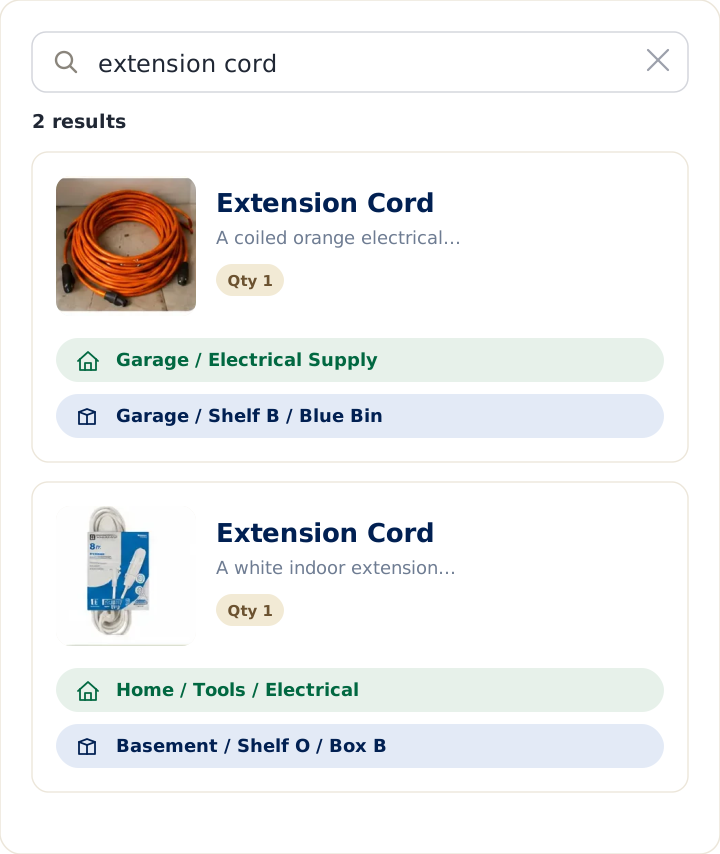
Sortly and LivingLedger both keep track of things, but they’re built for different jobs. Sortly is inventory software designed largely for businesses and teams — stock, assets, quantities, and reporting. LivingLedger is built for the home: finding what you already own by remembering exactly where you put it. The right choice depends on which problem is actually yours.
A note on accuracy: the Sortly details below are drawn from Sortly’s own current website and help center as of July 2026. Where Sortly doesn’t publish a specific number, this guide points you to Sortly’s pricing page rather than guess.
Quick answer
Choose Sortly if you’re managing business or asset inventory — tracking quantities and stock levels, equipment across locations, a team with shared access, barcode/QR labels, and exportable reports.
Choose LivingLedger if your real question is “where did I put it?” at home — you want to find the tools, the decorations, the thing you packed when you moved, without digging through bins, and you don’t need business stock controls.
The question each one answers
Sortly answers “what’s in my inventory, and how much of it do I have?” — a stock-and-assets question. LivingLedger answers “where did I put it?” — a retrieval question. That difference drives almost everything else, so it’s worth being honest about which one you’re really asking.
Where Sortly is genuinely stronger
For business and asset inventory, Sortly is the more capable tool, and it’s fair to say so. It’s built around quantities and stock levels, custom fields and folders, barcode and QR scanning, team access with permissions, and reports you can export — the things a shop, warehouse, field-service crew, or office needs. If you’re tracking equipment, supplies, or stock that moves and gets counted, that depth is exactly the point, and LivingLedger isn’t trying to replace it.
Where LivingLedger is different
LivingLedger is item-first and household-focused. You add an item, tag where you put it — locations nest up to three levels deep, like Garage › Shelf B — and later you just search the item’s name to see where it is. You search the item, not the box. Adding items can be as quick as a photo: one AI photo scan can identify up to 10 items at once. It’s designed to reduce the everyday mental load of remembering where things live, not to run a business’s stockroom. (More on the LivingLedger home inventory app.)
Free plans, honestly compared
Sortly’s free plan is meant for trying it out and small personal use: it includes 100 entries total, where an entry is any item or folder combined. Its paid tiers (Advanced, Ultra, Premium, and Enterprise) raise those limits and add business features; for current paid pricing and limits, check Sortly’s pricing page, since those change over time.
LivingLedger’s free plan includes unlimited manual items — you can record your whole home by hand at no cost — plus 50 lifetime AI scan credits if you want to add items by photo. Pro unlocks unlimited AI scanning for personal household use, subject to fair-use limits.
Sortly vs LivingLedger: at a glance
| Sortly | LivingLedger | |
|---|---|---|
| Core question | What’s in my inventory, and how much? | Where did I put it? |
| Built for | Business / asset / team inventory | Households finding their stuff |
| Free plan | 100 entries (items + folders) | Unlimited manual items |
| Adding items | Manual, barcode & QR scanning | Manual or AI photo (up to 10 per photo) |
| Finding things | Search, folders, reports | Search the item → see its location |
| Locations | Folders / structure you build | Nest up to 3 levels deep |
Who should not choose LivingLedger
If you need to manage business stock, track asset quantities and values across multiple sites, give a team role-based access, or generate inventory reports, Sortly (or a dedicated business inventory tool) is the better fit. LivingLedger is deliberately focused on household retrieval, not business inventory control.
Bottom line
Sortly is a strong inventory platform for businesses that need structured stock control, QR and barcode labels, user permissions, reporting, purchase orders, and multi-location workflows.
LivingLedger is built for a different job: helping households remember where things are.
If you are trying to manage tools across job sites, deploy equipment, run stock counts, track medical supplies, coordinate multiple employees, or create barcode labels for a team, Sortly is probably the better fit — the same is true for a warehouse, medical office, or service truck operation.
If you are trying to find the batteries, the extension cord, the holiday lights, the spare charger, the moving box with tax papers, or the bin where you put the extra faucet filter, LivingLedger is designed for that simpler household reality: you know you own the thing, but you cannot remember exactly where you put it.
The biggest difference is effort. Sortly asks users to organize inventory through folders, custom fields, quantity tracking, labels, reports, and team workflows. LivingLedger keeps the workflow lighter: add household items manually or with AI photo scanning, save them into nested home locations, and search later when you need them.
For households, the question is usually not “How many units are in stock?”
The question is: “Where did I put that thing?”
Start free No credit card required.
Frequently asked questions
Is Sortly free, and what does the free plan include?
Sortly has a free plan aimed at trying the app and small personal use. Per Sortly's help center, it includes 100 entries total, where an entry is any combination of items and folders. Paid tiers (Advanced, Ultra, Premium, and Enterprise) raise the limits and add business features; check Sortly's pricing page for current paid rates, since they change over time.
What's the main difference between Sortly and LivingLedger?
Sortly is built for business and asset inventory: quantities, stock levels, team access, barcode and QR labels, and exportable reports. LivingLedger is built for the home: finding what you already own by remembering where you put it. Sortly answers what's in my inventory and how much; LivingLedger answers where did I put it.
Which is better for a business or warehouse?
Sortly. It's designed around stock and asset tracking, quantities, team permissions, and reporting, which is what a business needs. LivingLedger is focused on household retrieval and is not intended to run a business stockroom.
Does LivingLedger have barcode scanning like Sortly?
No. Sortly offers barcode and QR scanning. LivingLedger does not use barcode scanning; instead you add items manually or with an AI photo scan that can identify up to 10 items in a single photo, then you tag where each item is stored.
Is LivingLedger free?
Yes. LivingLedger's free plan includes unlimited manual items, so you can record your whole home by hand at no cost, plus 50 lifetime AI scan credits if you want to add items by photo. Pro unlocks unlimited AI scanning for personal household use, subject to fair-use limits.
Related comparisons
Weighing other ways to keep track of what you own? These guides compare the common alternatives:
- Compare all home inventory methods — the full comparison hub
- Notebook vs. LivingLedger
- Home inventory spreadsheet vs. app
- Itemtopia vs. LivingLedger
Still deciding? The LivingLedger FAQ answers common questions about how it works.