Printable inventory sheets are helpful when you need a simple snapshot of what you own. They work well for a rental walkthrough, a moving checklist, an insurance file, or a small storage area that rarely changes. But paper inventory gets weaker the moment real life starts moving.
You buy something new. You move a box. You use up supplies. Someone reorganizes a drawer. Suddenly the printed sheet is no longer reliable, and keeping it updated means crossing things out, rewriting rows, or printing a new copy.
LivingLedger is built for a different job: helping you find things later.
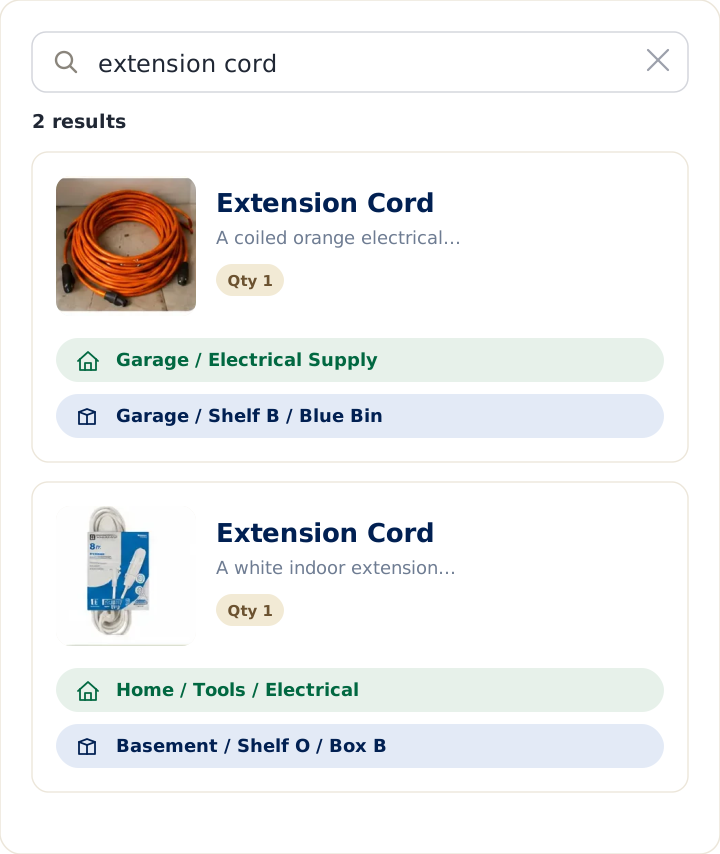
Instead of scanning paper rows by eye, you can search for an item and see where it lives. Instead of remembering which bin, shelf, drawer, or cabinet holds something, you can save the item with its exact location and update it as your home changes.
Quick answer
Use a printable inventory sheet when you need a one-time record — a rental walkthrough, a moving checklist, an insurance file, or a small storage area that rarely changes.
Use LivingLedger when you want a living, searchable memory of your home — you save items with their exact location and update them as your home changes.
Why a printable list is a natural starting point
Printable inventory sheets ask nothing of you up front: no account, no app, no learning curve. You print a grid with columns for the item, where it is, and a few notes, and you start writing. That instinct is right — you’re giving your home a written memory. Paper is just the first tool within reach.
Where printable sheets quietly stop working
1) They’re static. The moment you move a bin, use something up, or buy something new, the sheet is out of date — and the only fix is to cross things out or print a fresh copy.
2) You can’t search them. To find the spare furnace filter, you have to remember which sheet it’s on and scan down the rows by eye. That’s often slower than just opening the cupboard, so the sheet stops getting used.
3) They’re not with you when it counts. The printout is at home in a binder, not in your pocket at the store — so you buy a second one because you couldn’t check the first.
The real difference: a printout is a snapshot; LivingLedger stays current
A printable sheet captures one moment in time. LivingLedger is a living, searchable record: you add an item in seconds, tag where you put it (Garage › Shelf B, or Kitchen › Pantry › Top Shelf, up to three levels deep), and later just search the item’s name to see where it is. You search the item, not the box — and you can do it from the store aisle. (See the LivingLedger home inventory app overview.)
Printable sheet vs LivingLedger: at a glance
| Need | Printable inventory sheet | LivingLedger |
|---|---|---|
| Create a one-time household record | Strong | Strong |
| Search for an item later | Scan rows manually | Search by name |
| Update after things move | Cross out or reprint | Edit anytime |
| Use while shopping | Usually left at home | Available on your phone |
| Track exact storage locations | Only as written | Nested locations up to 3 levels |
| Add photos | No | Yes |
| Best for | Static snapshots | Everyday retrieval |
When a printable sheet is genuinely fine
If you’re documenting a short, fixed list you won’t change often — a single closet, a rental walkthrough, a quick snapshot to file away — a printable sheet does the job and there’s no reason to overthink it. It starts costing you when the list needs to keep changing and you need to find things fast across many places.
Keep the paper habit, lose the reprinting
The printable sheet had the right idea: write down what you have and where it is. LivingLedger keeps that idea but makes it searchable and current. You can update items as your home changes, search when you need to find something, and — on the web app — print a fresh inventory view when paper is useful. (Printing is a web-app feature; the iOS app doesn’t currently print.)
Start with one shelf, add a few items, search for one, and feel the difference.
Paper is fine for documentation. LivingLedger is for actually finding things.
Start free No credit card required.
Frequently asked questions
What is a good alternative to a printable home inventory list?
A searchable app like LivingLedger. Instead of scanning printed rows by eye, you type an item's name and it tells you where you put it, and the list updates as you go instead of needing a reprint. If you still want paper, LivingLedger's web app can print your current view on demand.
Can LivingLedger print my inventory like a printable sheet?
Yes, on the web app. The print option opens your browser's print dialog over your current filtered or searched view, showing a table with Name, Brand, Qty, Location, Expiration, and Notes. The iPhone app does not print directly, but you can open the web app in any browser to print.
Do I have to reprint every time something changes?
With a printable sheet, yes, or you cross entries out by hand. With LivingLedger you edit an item in seconds and the record stays current, so you only print when you actually want a paper copy.
Is LivingLedger free?
Yes. LivingLedger's free plan includes unlimited manual items, so you can record your whole home by hand at no cost, plus 50 lifetime AI scan credits if you want to add items by photo. Pro unlocks unlimited AI scanning for personal household use, subject to fair-use limits. See the pricing page for current plan details.
Related comparisons
Weighing other ways to keep track of what you own? These guides compare the common alternatives:
- Compare all home inventory methods — the full comparison hub
- Notebook vs. LivingLedger
- Home inventory spreadsheet vs. app
- Itemtopia vs. LivingLedger
Still deciding? The LivingLedger FAQ answers common questions about how it works.