Libib and LivingLedger both help you keep track of what you own, but they solve different problems. Libib is a polished media cataloging tool — books, movies, music, and games — built to answer “what books, movies, games, or music do I own?” LivingLedger is a searchable memory for your whole home — tools, decorations, pantry items, storage bins, closets, garage items — built to answer “where in my house did I put that thing?” Which one fits depends on what you’re actually trying to keep track of.
A note on accuracy: the Libib details below are drawn from Libib’s own website and support center as of July 2026. Where Libib doesn’t publish a specific detail, this guide leaves it out rather than guess.
Libib pricing at a glance
Libib’s Basic and Pro plans support cataloging books, movies, music, video games, board games, and other collections. Libib Basic is free for collections of up to 5,000 items. Libib Pro costs $9 per month or $99 per year, supports up to 100,000 items, and adds lending, patron, barcode-management, reporting, and multi-user features. Pricing checked July 2026.
LivingLedger is built specifically for household inventory. LivingLedger is free to start. Manual items are unlimited on both Free and Pro. Free includes 50 lifetime AI scan credits, while Pro unlocks unlimited AI scanning for personal household use, subject to fair-use limits. See the pricing page for current plan details.
- Libib Basic: Free, up to 5,000 items
- Libib Pro: $9/month or $99/year
- LivingLedger Free: Free, unlimited manual items and 50 lifetime AI scan credits
- LivingLedger Pro: Unlocks unlimited AI scanning for personal household use, subject to fair-use limits. See the pricing page for current plan details.
Quick answer
Choose Libib if you’re cataloging a media collection — books, movies, music, games — and you want fast barcode/ISBN lookup that fills in titles and cover art, plus lending tools to track what you’ve loaned out.
Choose LivingLedger if you want to find anything in your home — tools, decorations, pantry items, the box you packed when you moved — by remembering exactly where it is, not just what it is.
The question each one answers
Libib answers “what books and movies do I own?” — a cataloging question, with deep metadata for media. LivingLedger answers “where did I put it?” — a retrieval question, across every kind of household item. Libib is about the catalog; LivingLedger is about the location.
Where Libib is genuinely stronger
For media, Libib is excellent, and it’s only fair to say so. Scan a book’s ISBN or a movie’s barcode and Libib pulls in the title, author or director, cover art, and other details automatically — cataloging hundreds of items quickly. It also handles lending: you can track who borrowed what and when. Its free Basic plan is generous for a home library, supporting up to 5,000 items, and Libib Pro ($99/year, per libib.com) raises that to 100,000 items for educators, organizations, and power users. If your goal is a clean, detailed media library, Libib is built for exactly that.
Where LivingLedger is different
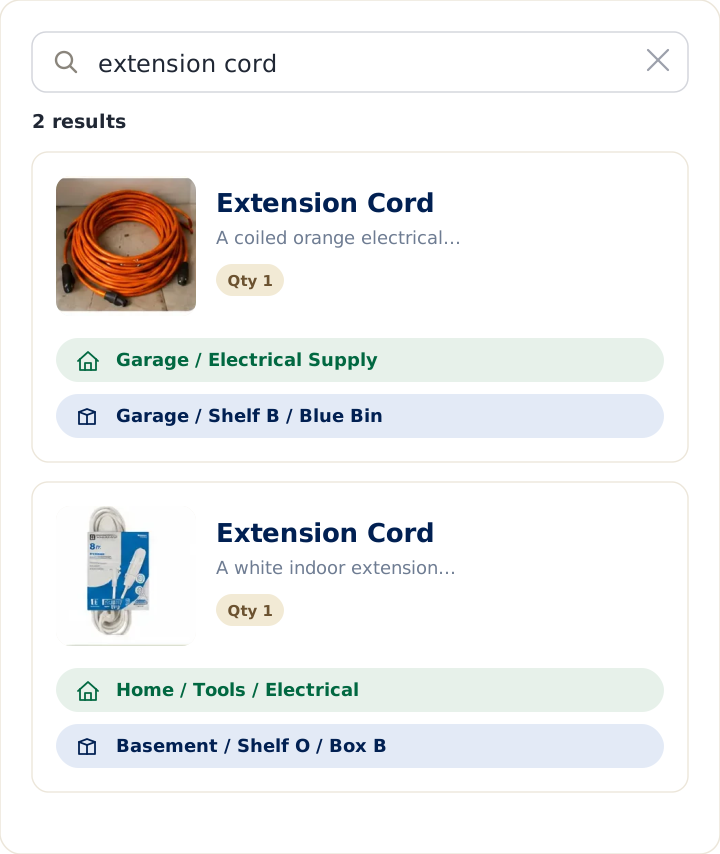
LivingLedger isn’t media-specific — it’s for the whole home, and its job is finding things. You add an item, tag where you put it (locations nest up to three levels deep, like Garage › Shelf B), and later search the item’s name to see where it is. You search the item, not the box. Adding items can be a quick AI photo scan that identifies up to 10 items at once. The point isn’t a beautiful catalog of one category; it’s confidently finding any belonging, anywhere in the house. (More on the LivingLedger home inventory app.)
Free plans, honestly compared
Libib’s free Basic plan is aimed at personal home libraries and supports up to 5,000 items — plenty for most media collections — with Libib Pro at $99/year lifting the cap to 100,000 items. Its strengths are concentrated on media.
LivingLedger’s free plan includes unlimited manual items across every category in your home, plus 50 lifetime AI scan credits for adding items by photo. Pro unlocks unlimited AI scanning for personal household use, subject to fair-use limits.
Libib vs LivingLedger: at a glance
| Feature | Libib Basic | Libib Pro | LivingLedger Free | LivingLedger Pro |
|---|---|---|---|---|
| Price | Free | $9/month or $99/year | Free | Free to start; see current Pro pricing |
| Item limit | Up to 5,000 | Up to 100,000 | Unlimited manual items | Unlimited manual items |
| Primary entry method | ISBN/UPC scanning, imports, manual entry | ISBN/UPC scanning, imports, manual entry | Manual entry plus 50 lifetime AI scan credits | Manual entry plus unlimited AI scanning, subject to fair-use limits |
| Organization model | Collections and tags | Collections, tags, managers, patrons, and lending tools | Household categories and nested locations | Household categories and nested locations |
| Finding items later | Search within collections and metadata | Search within collections and metadata | Search for an item and see its saved household location | Search for an item and see its saved household location |
| Best suited for | Personal media collections | Schools, organizations, libraries, and large collections | Personal household inventory | Household inventory with frequent AI photo scanning |
Who should not choose LivingLedger
If your main goal is a richly detailed media library — automatic book and movie metadata, cover art, and lending records — Libib is the better tool, and LivingLedger isn’t trying to replace it. LivingLedger’s focus is finding where any item is stored across the whole home, not building a media catalog.
Bottom line
If you mainly want to catalog books, movies, music, or games, Libib is probably the better fit — its metadata lookup and lending tools are built for exactly that.
If you want to organize storage bins, closets, tools, decorations, pantry items, household supplies, and everyday things around your home — and be able to find them again in seconds — LivingLedger is built for that.
Start free No credit card required.
Frequently asked questions
How much does Libib Pro cost?
Libib Pro costs $9 per month or $99 per year. Additional library managers cost $2 per month or $24 per year each. Pricing checked July 2026.
What is the difference between Libib Basic and Pro?
Libib Basic is free and supports up to 5,000 items. Libib Pro supports up to 100,000 items and adds features including lending and holds, patron management, barcode management, reporting, published-library customization, and multi-user management.
Is Libib free, and what does the free plan include?
Libib's free Basic plan is aimed at personal home libraries and supports up to 5,000 items, per libib.com. Libib Pro costs $9/month or $99/year and raises the limit to 100,000 items, with options for additional managers. Libib's features are concentrated on cataloging media such as books, movies, music, and games.
What's the difference between Libib and LivingLedger?
Libib is a media cataloging tool: it's built to record books, movies, music, and games, with barcode and ISBN lookup and lending tools. LivingLedger is a searchable memory for your whole home, built to find any household item by remembering where it is. Libib answers what books and movies do I own; LivingLedger answers where did I put it.
Can LivingLedger catalog books and movies like Libib?
You can add books, movies, or any other item to LivingLedger, including a photo and a location tag. Libib is purpose-built for detailed media libraries, with automatic title, author, and cover art lookup and lending tools. LivingLedger's job is different — finding where things are stored across your whole home.
Does LivingLedger track where an item is stored?
Yes. Tracking location is its core purpose. You tag where you put each item, with locations that nest up to three levels deep, such as Garage then Shelf B, and later you search the item's name to see exactly where it is.
Is LivingLedger free?
Yes. LivingLedger is free to start. Free includes unlimited manual inventory items and 50 lifetime AI scan credits, and the credits do not reset or refill. Pro unlocks unlimited AI scanning for personal household use, subject to fair-use limits. See the pricing page for current plan details.
Which is better for household inventory: Libib or LivingLedger?
Libib is designed primarily for cataloging collections such as books, movies, music, video games, and board games, with strong library-management features. LivingLedger is designed specifically to help people remember what household items they own and where those items are stored, supporting nested locations up to three levels deep.
Related comparisons
Weighing other ways to keep track of what you own? These guides compare the common alternatives:
- Compare all home inventory methods — the full comparison hub
- Notebook vs. LivingLedger
- Home inventory spreadsheet vs. app
- Itemtopia vs. LivingLedger
Still deciding? The LivingLedger FAQ answers common questions about how it works.