Most of us become the backup memory for an aging parent’s home.
LivingLedger helps you set up a simple searchable home inventory together, so your parent can find the things they put away — without opening every drawer, cabinet, closet, and box.
Each photo can identify up to 10 items. Unlimited manual items on the free plan — and if Pro ends, you keep your saved inventory.
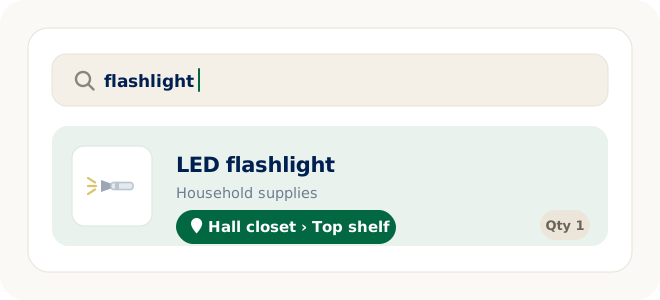
Every home has its own filing system. The drawer where the batteries live. The closet shelf with the flashlights. The cabinet that holds the appliance manuals. It works — but almost none of it is written down anywhere. Setting up LivingLedger together gives that knowledge a second home: each item saved with the place it’s kept, so “where is it?” becomes a quick search instead of a walk through the whole house.
This page is for the adult child who wants to make everyday life a little easier for a parent — without taking anything over. The setup is something you can do together in an afternoon: a simple, searchable home inventory of the household items that get looked for again and again. Your parent stays fully in charge of their own home and their own inventory; the system just does the remembering about where things were put.
The real problem is finding, not owning
These are the questions a household inventory answers. Notice what they have in common: the thing exists, somewhere in the house. The only missing piece is where.
Questions like these are the ordinary cost of a house with many drawers and a lifetime of useful things in it — and they have an ordinary fix: write down where things are kept, once, in a place that can be searched.
Set it up together
The nicest way to start is as a shared project. Sit down together with a phone or a computer, create the account, and build the first few entries side by side — one person opening drawers and calling out what’s there, the other saving items and locations. It goes quickly, and deciding together what’s worth saving is half the value: the inventory ends up reflecting how your parent thinks about their home, in their words.
One thing to know before you start: LivingLedger is currently single-user — one account, one inventory. Shared household inventories are planned but not available yet. So the natural setup is your parent’s own account, on their phone or computer. You can absolutely help build it — sitting together while your parent is signed in during a visit — and afterward the inventory lives with them, in their hands. The inventory is tied to the account rather than one device, so the same items show up whether they open it on an iPhone or in a browser on the computer.
Start small — one drawer, not the whole house
Do not try to inventory the entire house. That project stalls in every home it’s attempted in. Start with:
- The things that get looked for most. Spare keys, flashlights, batteries, chargers, extension cords, scissors, tape — the small handful of items behind most “where is it?” moments.
- One drawer or one cabinet. The junk drawer alone answers more future questions than most rooms do.
- One storage shelf or one box. The utility shelf in the basement, the box of manuals, the tote of holiday decorations — the same way a storage bin inventory gets built one bin at a time.
Twenty or thirty saved items is a genuinely useful inventory. It can grow whenever something new gets put away — there’s no deadline and no finish line to reach before it starts paying off.
How it works
Pick one spot to start
A drawer, a cabinet, a closet shelf, a storage box. Open it up and decide together what in it is worth being able to find again.
Add the items
Type each one in, or take a photo with the AI scan — one photo can recognize one item or up to 10, and the same flow works for a shelf, cabinet, drawer, storage box, or storage area. Name items in plain words, the way they’ll be searched for later: flashlight, furnace filters, spare car key.
Save where each thing is kept
Locations can nest up to three levels, which is enough to describe where things really sit: Basement → Utility shelf → Blue bin. Everything in the same spot shares the location, so it’s set once per drawer, not once per item.
Search the item, not the room
Later, the question isn’t “which closet was it?” — it’s just the item. Search flashlight and the answer comes back: Hall closet → Top shelf. Search furnace filters: Basement → Utility shelf → Blue bin. No opening drawers to check.
Photos help tell similar things apart
Any saved item can have a photo attached, on the Free plan as well as Pro. That helps most when things look alike from memory — two extension cords of different lengths, several near-identical chargers, the right remote among four. A quick photo saved with the item settles “is that the one?” before anyone walks to the closet to check.
The inventory is free to keep
Manual inventory items are unlimited on the Free plan, and search works the same however an item was added. That matters here: a household inventory built by hand costs nothing, this month or ever, and there is no subscription required to keep using what was saved. AI scanning is an optional convenience for faster setup — not the price of admission.
AI can make the first afternoon faster
If you want to move quickly through a shelf or a drawer, the AI photo scan helps: one photo can recognize one item or up to 10, and it works on shelves, cabinets, drawers, storage boxes, and storage areas. It proposes; you confirm — you review the suggested items, rename anything into plainer words, then save. The Free plan includes 50 lifetime AI scan credits, and each photo scan uses one credit — including scans that fail or come back empty — and the credits don’t reset or refill. Pro unlocks unlimited AI scanning for personal household use, subject to fair-use limits.
A practical division of labor: you use AI scanning during the setup visit to get the first shelves in quickly, and afterward your parent adds the occasional new item manually — which is free, unlimited, and usually one item at a time anyway. Everything saved stays fully usable on the Free plan.
What LivingLedger is not
It’s worth being clear about the boundaries, because this space is full of tools that do more than a household needs:
- Not a medical or monitoring product. There are no alerts, no check-ins, no supervision features. It’s an inventory with a search box.
- Not a way to watch someone’s home remotely. There is nothing to observe — just the items and locations that were saved on purpose.
- Not an emergency or medication system. It doesn’t remind, dispense, or notify anyone of anything.
- Not a shared family inventory — yet. It’s single-user today; shared household inventories are planned but not available.
What it is: a calm, private place to write down what’s in the house and where it’s kept, that can answer the question later.
FAQ
Helping a parent set this up
How can I help my parent keep track of household items?
Set up a simple searchable inventory together. Save each item worth finding again — spare keys, flashlights, batteries, filters, manuals — with the place it is kept, named in plain words. Later, instead of opening drawers and cabinets, your parent searches the item and LivingLedger shows the location that was saved.
Does my parent need to inventory the whole house?
No — and trying to is the fastest way to give up. Start with one drawer, one cabinet, or one storage shelf, focusing on the things that get looked for most often. A small inventory that answers real questions is worth more than a complete one that never gets finished. Add more whenever it feels useful.
Can we add items manually?
Yes. Manual inventory items are unlimited on every plan, and manual entry is always available. Type the item name, pick its location, and save — no photo or AI scan required. A household inventory built entirely by hand works exactly the same in search.
Can a photo help add several items at once?
Yes. One AI photo scan can recognize one item or up to 10 items, and the same flow works for shelves, cabinets, drawers, storage boxes, storage areas, or a single item. You review what the AI proposes, adjust anything if needed, then save. On the Free plan, each AI photo scan uses one of the 50 lifetime credits.
Can I share the same inventory with my parent?
Not yet. LivingLedger is currently single-user, and shared household inventories are planned but not available. The inventory is tied to one account rather than one device, so your parent can sign in on their own phone or computer and see the same items — but it is one account, not a shared one. The practical approach is to build the inventory together in your parent’s account.
Does LivingLedger work on a computer?
Yes. LivingLedger runs as a web app in modern browsers on a computer, and there is also a native iOS app for iPhone and iPad. Signing in with the same account on another supported phone or computer shows the same inventory, so your parent can use whichever screen is most comfortable.
Is LivingLedger free?
LivingLedger is free to start. Manual inventory items are unlimited, and Free includes 50 lifetime AI scan credits — each AI photo scan uses one credit, and the credits do not reset or refill. Pro unlocks unlimited AI scanning for personal household use, subject to fair-use limits. See the pricing page for current plan details.
Next time, search instead of digging.
Start with one drawer, together. Save what’s in it and where it lives — then check the inventory instead of the closets.
Free plan · No credit card required · Web app + iOS app